
Achievable logoAchievable logo
CCNA
Sign in
Sign up
Purchase
Textbook
Practice exams
Support
How it works
Exam catalog
Mountain with a flag at the peak
Textbook
Introduction
1. Introduction to networking
1.1 What is networking?
1.2 Components of a TCP/IP based network
1.3 How devices communicate on a TCP/IP based network
1.4 The layers of the TCP/IP model
1.5 Introduction to the Transport Layer
1.5.1 The Transport Layer
1.5.2 TCP vs. UDP
1.6 Introduction to network architecture
2. Administering Ethernet LANs
3. IP connectivity
4. Network services
5. IPv6
6. Wireless networking
7. Network management and administering network devices
8. Network security fundamentals
9. Network automation and programmability
Wrapping up
Achievable logoAchievable logo
1.5.2 TCP vs. UDP
Achievable CCNA
1. Introduction to networking
1.5. Introduction to the Transport Layer
Our CCNA course is currently in development and is a work-in-progress.

TCP vs. UDP

8 min read
Font
Discuss
Share
Feedback

Both TCP and UDP are Transport layer (“Layer 4”) protocols. The key difference is that TCP is connection-oriented, while UDP is connectionless.

Transmission control protocol (TCP)

TCP establishes a session between two endpoints before they begin exchanging data. This session is what makes TCP a reliable Transport protocol:

  • It lets the endpoints confirm delivery of the data they send.
  • It supports recovery when segments are lost in transit.

TCP also includes a mechanism called flow control. Flow control lets the receiver tell the sender to slow down when:

  • the receiver can’t process data as quickly as it’s arriving, or
  • the network is congested.

When conditions improve, TCP can also increase the sending rate.

Recall from the previous chapter Chapter 1.5.1 The Transport Layer that Transport layer protocols take an end-to-end stream of data and break it into smaller pieces called segments. Segments make large transfers manageable instead of sending one long, continuous block of data.

With TCP, each segment is assigned a sequence number. Think back to the “letter with multiple pages” example: sequence numbers let the client and server track which segments belong to a particular data flow and detect segments that arrive out of order.

TCP can also recover from loss. For each segment the sender transmits, it expects an acknowledgement (ACK) from the receiver. If the sender doesn’t receive an ACK, it won’t continue sending subsequent segments until that missing acknowledgement arrives.

The source port of a TCP message is often an ephemeral port number ( >1024) that the client randomly selects when establishing the session. The destination port is the port the server application is listening on. The client must know this destination port ahead of time; it’s typically built into the application or operating system. Clients and servers can also negotiate port numbers to build multiple sessions in parallel.

To identify the endpoints, TCP associates port numbers with IP addresses. The combination of:

  • a source IP address and source port, and
  • a destination IP address and destination port

is called a socket. Take the example below.

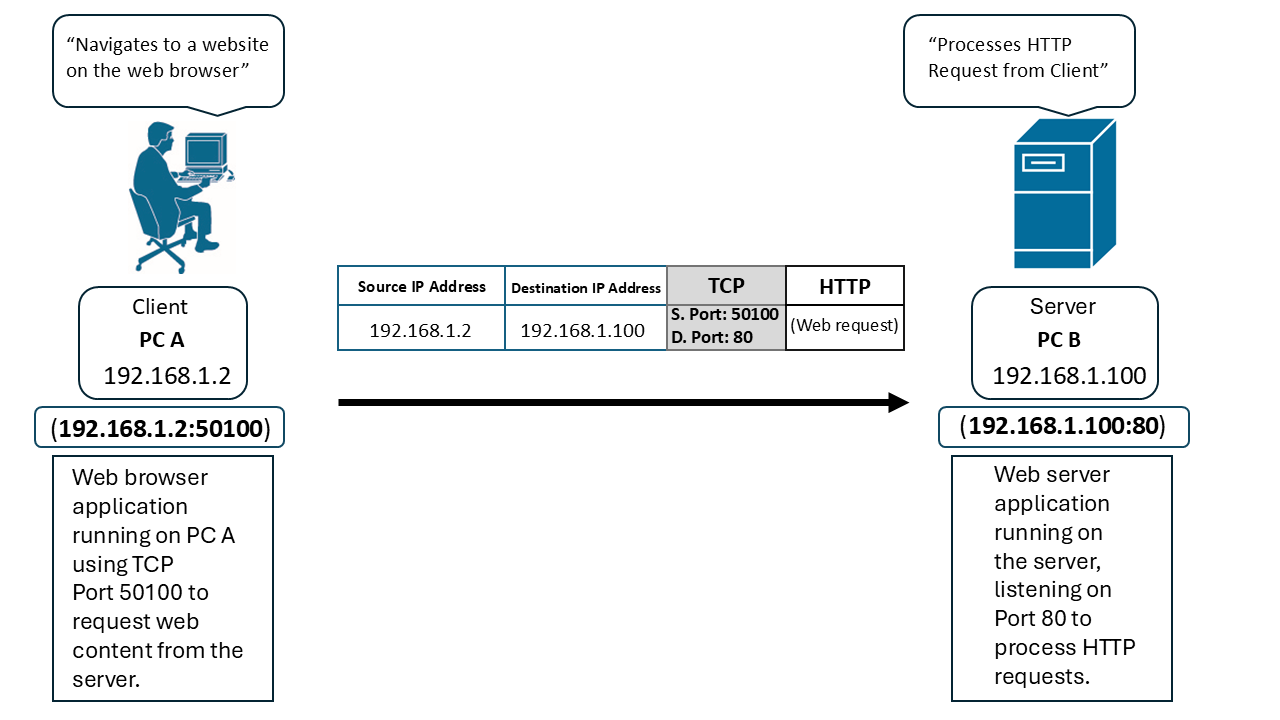
TCP socket connection between client PC A and server PC B using TCP port 50100 for web communication
TCP socket between the Client (PC A) and the Server (PC B)
 

PC A (the client) is running a web browser and wants to request a web page from the server (PC B). PC A tells PC B:

  • the IP address to send the data to, and
  • the port number where the browser is listening for the response.

In this example, the client’s browser is using port 50100, so PC A binds this port to its IP address using a colon:

192.168.1.2:50100

PC B (the server) is running a web server application that listens on TCP port 80.

Which well-known TCP application uses TCP Port 80?

(spoiler)

HTTP

So PC B binds its listening port to its IP address:

192.168.1.100:80

Both PC A and PC B are using an application that understands HTTP to store and process the contents of the webpage. But it is TCP that transports the data from the Server to the Client (and vice versa), so that the Client can then view the contents of the web page on its browser.

TCP 3-way handshake

To form this socket (or session), the endpoints use the 3-way handshake. During this process, both sides agree to establish a TCP session.

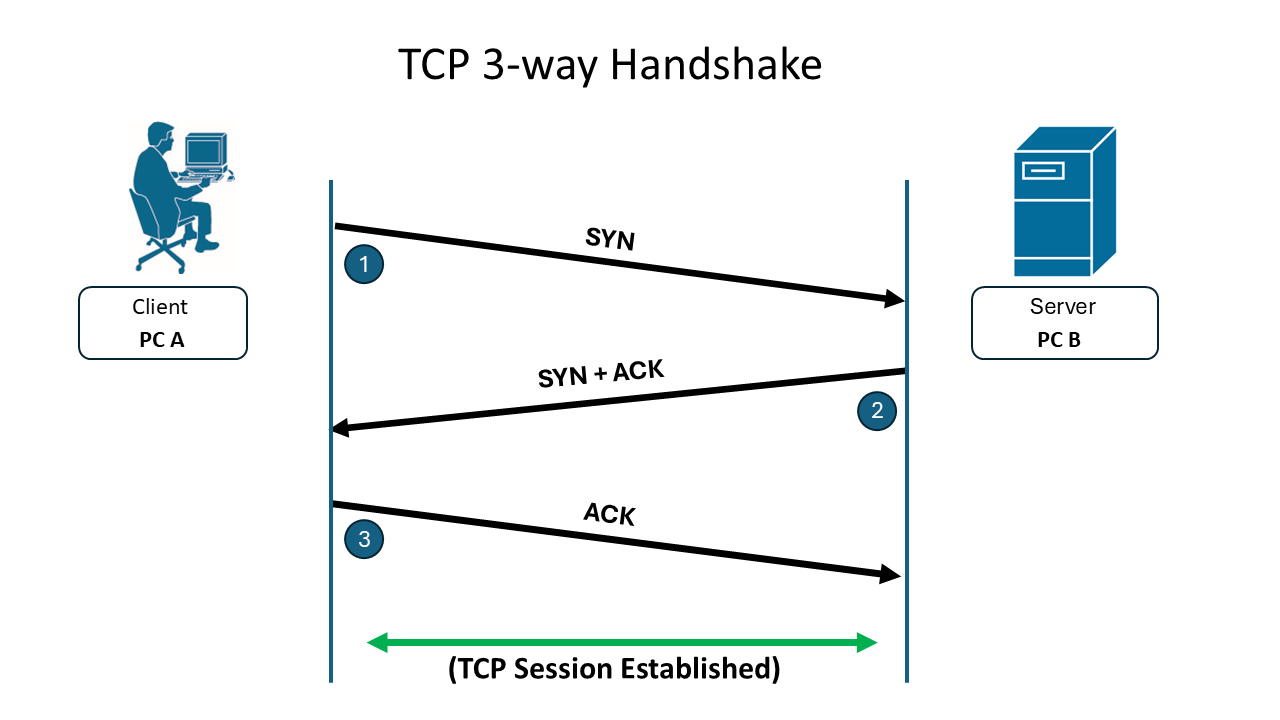
TCP three-way handshake between a client and server establishing a TCP session
TCP 3-way handshake

The 3-way Handshake occurs as follows:

SYN

The endpoint that initiates the TCP session is known as the Client. The Client will send a “SYN” (or Synchronize) packet to the Server to request that a session is established between them. The SYN message can be thought of as a greeting message that the Client is sending to the Server. This message will also contain the initial sequence number for the session.

SYN-ACK

If the Server is willing to establish a session with the Client, then it after it receives the SYN message, it will reply to the Client with a “SYN-ACK” message, acknowledging that it received the Client’s request to initiate a session and that it is willing to move further.

ACK

Upon receipt of the Server’s SYN-ACK message, the Client will respond with an “ACK” message back to the Server, letting it know that the session is now established, and they can begin exchanging data.

After the session is established, the client requests application data and the server responds with that data.

Keep in mind that for every TCP segment containing application data that the server sends, the client must reply with an ACK acknowledging receipt. If the server doesn’t receive the ACK, it won’t send subsequent portions of the data until it does.

If acknowledgements stop arriving for long enough, the application may close or reset the session. This is often described as the application timing out. Some sessions can also remain established even when no data is being exchanged for an extended period.

TCP’s behavior makes it very reliable. In most cases, that’s exactly what you want. However, there are situations where it’s undesirable. Requiring acknowledgements (and retransmitting when needed) adds overhead and can increase latency.

Some applications prefer lower latency and are willing to trade reliability for speed. For those cases, UDP is often used.

User datagram protocol (UDP)

UDP differs from TCP because it does not establish a session between the client and the server. Application data is still sent in segments, but there is no guarantee of delivery, which makes UDP an unreliable transport protocol.

UDP uses many of the same ideas as TCP:

  • source and destination port numbers
  • association of those ports with the client and server IP addresses (sockets)

There may be some initial communication between the client and server, but once the server learns the client’s destination IP address and port, it can send segments immediately until the transfer is complete (or until the application is interrupted or terminated). In some designs, the UDP source and destination ports are negotiated using an initial TCP session, and then the UDP transfer happens afterward.

UDP is commonly used for audio and video streaming applications, such as Voice over IP (VoIP) phones, online video platforms, and TV/movie streaming services. Low latency matters because the goal is a continuous stream of audio and/or video. If segments are lost or the network is congested, quality may degrade, and that’s an expected tradeoff.

Audio and video aren’t the only uses for UDP. It can also be used for large bulk file transfers, such as backing up data from PCs to a server. These tasks often need to move a lot of data within a specific time window, and UDP avoids the per-segment acknowledgement overhead.

UDP can still detect errors using a checksum in the segment. The receiver calculates its own value and compares it to the checksum:

  • If the calculation matches, the data likely arrived intact.
  • If it doesn’t match, the application detects corruption and typically reports an error.

Because UDP doesn’t establish a session, the sender doesn’t automatically retransmit corrupted or missing data. Often, the transfer must be restarted manually.

TCP also includes a checksum in every segment. The difference is that TCP can request retransmission when data is missing or corrupted. Also, UDP does not inherently use sequence numbers, so segments may arrive out of order.

Here are some common Well-Known ports for UDP applications:

  • DNS (Port 53):
    • The Domain Name System often uses UDP for domain name resolution.
  • DHCP (Ports 67, 68):
    • The Dynamic Host Configuration Protocol uses UDP for assigning IP addresses to devices on a network.
  • NTP (Port 123):
    • The Network Time Protocol uses UDP to synchronize clocks across a network.
  • TFTP (Port 69):
    • The Trivial File Transfer Protocol uses UDP for simple file transfers.
  • SNMP (Ports 161, 162):
    • The Simple Network Management Protocol uses UDP for network management.

All of the protocols listed above will be discussed in more detail later in this book.

Transmission Control Protocol (TCP)

  • Connection-oriented; establishes session before data transfer
  • Reliable: uses acknowledgements (ACKs), sequence numbers, retransmissions
  • Flow control manages data rate based on receiver/network conditions
  • Segments data; each segment has a sequence number
  • Uses sockets: source IP:port + destination IP:port
  • Common port: 80 (HTTP)

TCP 3-way Handshake

  • SYN: client requests session, sends initial sequence number
  • SYN-ACK: server acknowledges and agrees to session
  • ACK: client confirms, session established

TCP Reliability Mechanisms

  • Requires ACK for each segment; retransmits if not received
  • Timeout if ACKs stop arriving
  • Adds overhead and latency, but ensures data delivery

User Datagram Protocol (UDP)

  • Connectionless; no session establishment
  • Unreliable: no delivery guarantee, no retransmissions, no sequence numbers
  • Uses sockets (source/destination IP and port)
  • Lower overhead and latency; suitable for streaming and bulk transfers
  • Includes checksum for error detection (not correction)

Common UDP Applications and Ports

  • DNS: Port 53
  • DHCP: Ports 67, 68
  • NTP: Port 123
  • TFTP: Port 69
  • SNMP: Ports 161, 162

Sign up for free to take 9 quiz questions on this topic

Previous
Next  | 1.6.1 Network topology architectures
All rights reserved ©2016 - 2026 Achievable, Inc.

TCP vs. UDP

Both TCP and UDP are Transport layer (“Layer 4”) protocols. The key difference is that TCP is connection-oriented, while UDP is connectionless.

Transmission control protocol (TCP)

TCP establishes a session between two endpoints before they begin exchanging data. This session is what makes TCP a reliable Transport protocol:

  • It lets the endpoints confirm delivery of the data they send.
  • It supports recovery when segments are lost in transit.

TCP also includes a mechanism called flow control. Flow control lets the receiver tell the sender to slow down when:

  • the receiver can’t process data as quickly as it’s arriving, or
  • the network is congested.

When conditions improve, TCP can also increase the sending rate.

Recall from the previous chapter Chapter 1.5.1 The Transport Layer that Transport layer protocols take an end-to-end stream of data and break it into smaller pieces called segments. Segments make large transfers manageable instead of sending one long, continuous block of data.

With TCP, each segment is assigned a sequence number. Think back to the “letter with multiple pages” example: sequence numbers let the client and server track which segments belong to a particular data flow and detect segments that arrive out of order.

TCP can also recover from loss. For each segment the sender transmits, it expects an acknowledgement (ACK) from the receiver. If the sender doesn’t receive an ACK, it won’t continue sending subsequent segments until that missing acknowledgement arrives.

The source port of a TCP message is often an ephemeral port number ( >1024) that the client randomly selects when establishing the session. The destination port is the port the server application is listening on. The client must know this destination port ahead of time; it’s typically built into the application or operating system. Clients and servers can also negotiate port numbers to build multiple sessions in parallel.

To identify the endpoints, TCP associates port numbers with IP addresses. The combination of:

  • a source IP address and source port, and
  • a destination IP address and destination port

is called a socket. Take the example below.


PC A (the client) is running a web browser and wants to request a web page from the server (PC B). PC A tells PC B:

  • the IP address to send the data to, and
  • the port number where the browser is listening for the response.

In this example, the client’s browser is using port 50100, so PC A binds this port to its IP address using a colon:

192.168.1.2:50100

PC B (the server) is running a web server application that listens on TCP port 80.

Which well-known TCP application uses TCP Port 80?

(spoiler)

HTTP

So PC B binds its listening port to its IP address:

192.168.1.100:80

Both PC A and PC B are using an application that understands HTTP to store and process the contents of the webpage. But it is TCP that transports the data from the Server to the Client (and vice versa), so that the Client can then view the contents of the web page on its browser.

TCP 3-way handshake

To form this socket (or session), the endpoints use the 3-way handshake. During this process, both sides agree to establish a TCP session.

The 3-way Handshake occurs as follows:

SYN

The endpoint that initiates the TCP session is known as the Client. The Client will send a “SYN” (or Synchronize) packet to the Server to request that a session is established between them. The SYN message can be thought of as a greeting message that the Client is sending to the Server. This message will also contain the initial sequence number for the session.

SYN-ACK

If the Server is willing to establish a session with the Client, then it after it receives the SYN message, it will reply to the Client with a “SYN-ACK” message, acknowledging that it received the Client’s request to initiate a session and that it is willing to move further.

ACK

Upon receipt of the Server’s SYN-ACK message, the Client will respond with an “ACK” message back to the Server, letting it know that the session is now established, and they can begin exchanging data.

After the session is established, the client requests application data and the server responds with that data.

Keep in mind that for every TCP segment containing application data that the server sends, the client must reply with an ACK acknowledging receipt. If the server doesn’t receive the ACK, it won’t send subsequent portions of the data until it does.

If acknowledgements stop arriving for long enough, the application may close or reset the session. This is often described as the application timing out. Some sessions can also remain established even when no data is being exchanged for an extended period.

TCP’s behavior makes it very reliable. In most cases, that’s exactly what you want. However, there are situations where it’s undesirable. Requiring acknowledgements (and retransmitting when needed) adds overhead and can increase latency.

Some applications prefer lower latency and are willing to trade reliability for speed. For those cases, UDP is often used.

User datagram protocol (UDP)

UDP differs from TCP because it does not establish a session between the client and the server. Application data is still sent in segments, but there is no guarantee of delivery, which makes UDP an unreliable transport protocol.

UDP uses many of the same ideas as TCP:

  • source and destination port numbers
  • association of those ports with the client and server IP addresses (sockets)

There may be some initial communication between the client and server, but once the server learns the client’s destination IP address and port, it can send segments immediately until the transfer is complete (or until the application is interrupted or terminated). In some designs, the UDP source and destination ports are negotiated using an initial TCP session, and then the UDP transfer happens afterward.

UDP is commonly used for audio and video streaming applications, such as Voice over IP (VoIP) phones, online video platforms, and TV/movie streaming services. Low latency matters because the goal is a continuous stream of audio and/or video. If segments are lost or the network is congested, quality may degrade, and that’s an expected tradeoff.

Audio and video aren’t the only uses for UDP. It can also be used for large bulk file transfers, such as backing up data from PCs to a server. These tasks often need to move a lot of data within a specific time window, and UDP avoids the per-segment acknowledgement overhead.

UDP can still detect errors using a checksum in the segment. The receiver calculates its own value and compares it to the checksum:

  • If the calculation matches, the data likely arrived intact.
  • If it doesn’t match, the application detects corruption and typically reports an error.

Because UDP doesn’t establish a session, the sender doesn’t automatically retransmit corrupted or missing data. Often, the transfer must be restarted manually.

TCP also includes a checksum in every segment. The difference is that TCP can request retransmission when data is missing or corrupted. Also, UDP does not inherently use sequence numbers, so segments may arrive out of order.

Here are some common Well-Known ports for UDP applications:

  • DNS (Port 53):
    • The Domain Name System often uses UDP for domain name resolution.
  • DHCP (Ports 67, 68):
    • The Dynamic Host Configuration Protocol uses UDP for assigning IP addresses to devices on a network.
  • NTP (Port 123):
    • The Network Time Protocol uses UDP to synchronize clocks across a network.
  • TFTP (Port 69):
    • The Trivial File Transfer Protocol uses UDP for simple file transfers.
  • SNMP (Ports 161, 162):
    • The Simple Network Management Protocol uses UDP for network management.

All of the protocols listed above will be discussed in more detail later in this book.

Key points

Transmission Control Protocol (TCP)

  • Connection-oriented; establishes session before data transfer
  • Reliable: uses acknowledgements (ACKs), sequence numbers, retransmissions
  • Flow control manages data rate based on receiver/network conditions
  • Segments data; each segment has a sequence number
  • Uses sockets: source IP:port + destination IP:port
  • Common port: 80 (HTTP)

TCP 3-way Handshake

  • SYN: client requests session, sends initial sequence number
  • SYN-ACK: server acknowledges and agrees to session
  • ACK: client confirms, session established

TCP Reliability Mechanisms

  • Requires ACK for each segment; retransmits if not received
  • Timeout if ACKs stop arriving
  • Adds overhead and latency, but ensures data delivery

User Datagram Protocol (UDP)

  • Connectionless; no session establishment
  • Unreliable: no delivery guarantee, no retransmissions, no sequence numbers
  • Uses sockets (source/destination IP and port)
  • Lower overhead and latency; suitable for streaming and bulk transfers
  • Includes checksum for error detection (not correction)

Common UDP Applications and Ports

  • DNS: Port 53
  • DHCP: Ports 67, 68
  • NTP: Port 123
  • TFTP: Port 69
  • SNMP: Ports 161, 162

More from Introduction to the Transport Layer

  • The Transport Layer