


Achievable logoAchievable logo
CMA Part 1
Sign in
Sign up
Purchase
Textbook
Practice exams
Support
How it works
Exam catalog
Mountain with a flag at the peak
Textbook
1. External financial reporting decisions
2. Planning, budgeting, and forecasting
3. Performance management
4. Cost management
5. Internal control
5.1 Governance, risk and compliance
5.2 System controls and security measures
5.2.1 General accounting system controls
5.2.2 System development controls
5.2.3 Application and transaction controls
5.2.4 Technology controls
5.2.5 Backup controls and business continuity planning
6. Technology and analytics
Achievable logoAchievable logo
5.2.5 Backup controls and business continuity planning
Achievable CMA Part 1
5. Internal control
5.2. System controls and security measures
Our CMA Part 1 course is currently in development and is a work-in-progress.

Backup controls and business continuity planning

6 min read
Font
Discuss
Share
Feedback

Learning outcome statements

The learning outcome statements relevant for this section are:

  1. identify and describe the types of storage controls and demonstrate an understanding of when and why they are used
  2. explain the importance of backing up all program and data files regularly, and storing the backups at a secure remote site
  3. define business continuity planning
  4. define the objective of a disaster recovery plan and identify the components of such a plan including hot, warm, and cold sites

Backup controls

Definitions
Backup controls
Policies and procedures designed to ensure that critical data and system programs are preserved and can be restored in the event of data loss, corruption, or system failure.

Backups provide a crucial safeguard against data loss due to hardware failure, cyberattacks, natural disasters, or human error.

To enhance their effectiveness, backup processes must be supported by robust controls, including:

  • Access controls: Restrict who can create, modify, or delete backup data.
  • Encryption: Encrypt backup files to protect data confidentiality during storage and transmission.
  • Regular testing: Periodically test backup restorations to verify data integrity and the effectiveness of recovery procedures.
  • Automated scheduling: Use automated systems to ensure backups occur regularly and consistently without manual intervention.
  • Backup logs and audit trails: Maintain records of all backup activity for monitoring and compliance.
  • Physical security: Protect onsite and offsite backup media from theft, damage, or unauthorized access through locked storage, surveillance, and environmental controls.

Importance of backup controls

  • Regularly backing up program and data files is essential for maintaining operational continuity and preventing significant disruptions.
  • Storing backups at a secure remote site, either physically offsite or through cloud-based solutions, protects against localized threats such as fires, floods, or physical theft.
  • Backups help organizations meet regulatory and compliance requirements related to data retention and disaster recovery planning.

Common backup methods

  1. Full backups: Capture all data and system files at a given point in time. This method is comprehensive but requires more storage space and time.
  2. Incremental backups: Only back up data that has changed since the last backup, saving time and storage but requiring more effort during restoration.
  3. Differential backups: Back up data changed since the last full backup, offering a balance between speed and comprehensiveness.
  4. Cloud backups: Store backup data on cloud platforms, offering accessibility, scalability, and built-in geographic redundancy.
  5. Disk and tape backups: Store data on physical media, which can be archived offsite for long-term retention and disaster recovery.
  6. Real-time replication: Continuously mirror data from a primary system to a backup system, allowing for minimal downtime in high-availability environments.

Establishing a formal backup policy is essential to ensure that backup controls are reliable and effective when needed.

Business continuity planning

Definitions
Business Continuity Planning (BCP)
The strategic and operational framework that organizations use to prepare for, respond to, and recover from disruptive events, such as natural disasters, cyberattacks, system failures, or pandemics.

The goal of BCP is to ensure that critical business functions can continue or be restored promptly with minimal disruption.

Disaster Recovery Plan (DRP) is a key component of business continuity. Its primary objective is to restore IT systems, data, and infrastructure after an outage or disaster. A well-designed DRP includes clearly defined recovery procedures, assigned responsibilities, communication plans, and documentation of recovery time objectives (RTOs) and recovery point objectives (RPOs).

Key components of a disaster recovery plan

  • Inventory of critical systems, applications, and data
  • Designated recovery personnel and their contact details
  • Emergency communication procedures
  • Step-by-step recovery procedures for each system
  • Regular testing and updating of the plan

Types of recovery sites

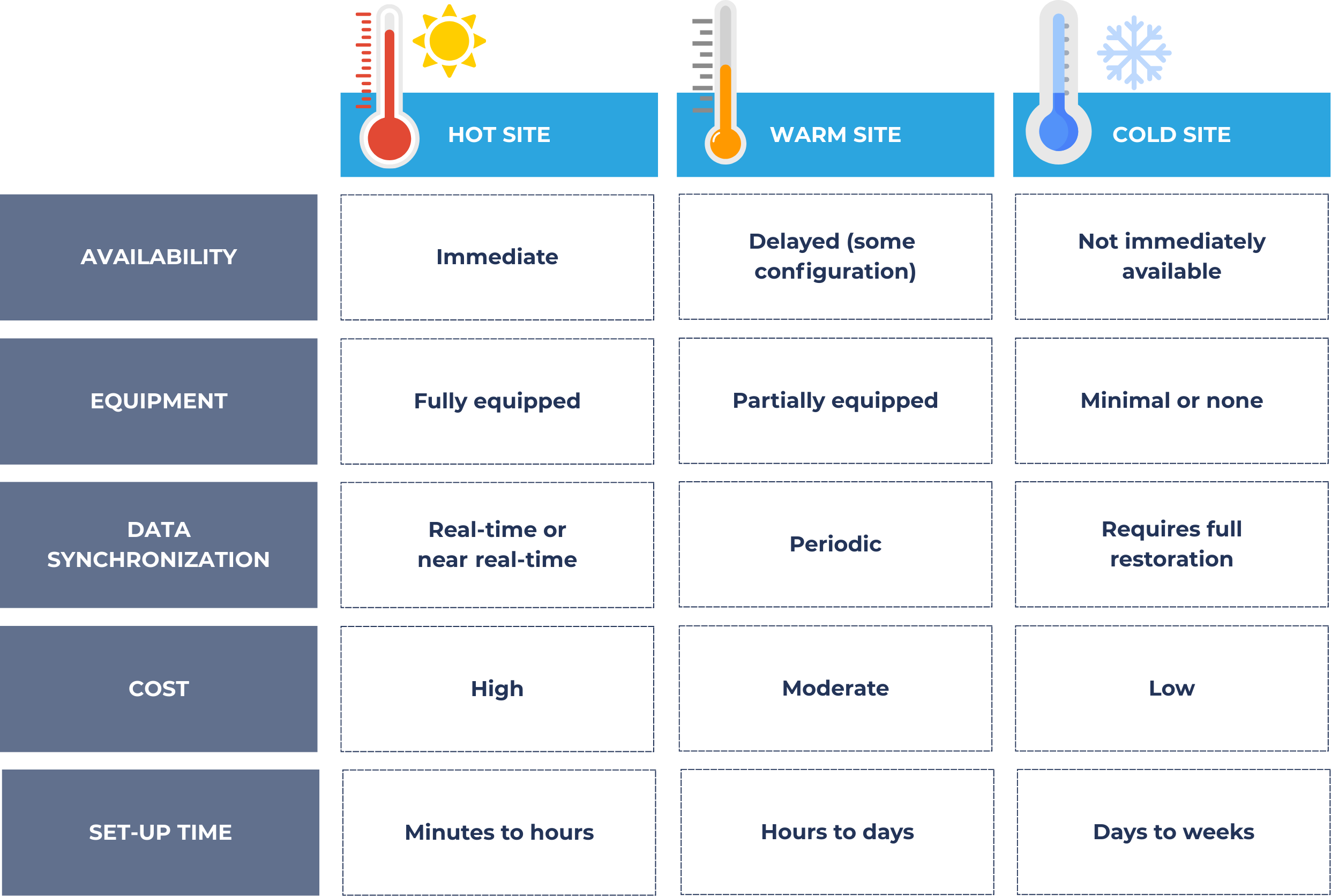
Organizations often prepare secondary locations, known as recovery sites, where operations can be temporarily resumed in the event of a disaster. These sites vary in readiness and cost:

Types of back-up sites

Each type of site has trade-offs between cost and recovery speed. Organizations choose based on their risk tolerance, business impact analysis, and available resources.

1. Hot site

A hot site is a fully operational and fully equipped facility that mirrors the original production environment, including hardware, software, and real-time or near real-time data replication. In the event of a disaster, business operations can be switched over to a hot site almost immediately with minimal interruption.

This type of site is ideal for organizations with very low tolerance for downtime or data loss. However, the comprehensive infrastructure and continuous data synchronization involved make hot sites the most expensive option among disaster recovery alternatives.

For example, a financial institution that must meet strict uptime requirements might maintain a hot site that allows it to resume customer transactions without delay.

2. Warm site

A warm site is a recovery facility that includes some pre-installed hardware and network connectivity, but it is not fully operational until additional setup is completed. Unlike a hot site, data is not continuously synchronized to a warm site, periodic backups or replications are used in a warm site instead. This means that during a disaster, organizations must first update or restore current data before resuming operations.

Warm sites offer a middle ground between cost and recovery time, making them a viable option for companies that need to recover within hours or days but do not require immediate failover capabilities.

For example, a regional office of a company might use a warm site that has backup servers and preloaded software but requires the latest backup data to be restored before work can continue.

3. Cold site

A cold site is a bare-bones facility with power, internet access, and physical space, but no installed IT infrastructure or live data. In the event of a disaster, the organization must deliver and install hardware, set up systems, and restore data from backups. This results in the longest recovery time among the three site types.

Cold sites are appropriate for non-critical operations or as part of a layered recovery strategy where full redundancy is not required.

For example, a non-profit or small business with limited IT needs might choose a cold site due to its low cost, accepting the trade-off of delayed recovery.

Backup controls

  • Ensure critical data and system programs can be restored after loss or failure
  • Key controls: access restrictions, encryption, regular testing, automated scheduling, backup logs, physical security
  • Backup types:
    • Full, incremental, differential, cloud, disk/tape, real-time replication

Importance of backup controls

  • Essential for operational continuity and disruption prevention
  • Offsite or cloud storage protects against local disasters
  • Supports regulatory and compliance requirements

Business Continuity Planning (BCP)

  • Framework for preparing, responding, and recovering from disruptions
  • Goal: maintain or quickly restore critical business functions

Disaster Recovery Plan (DRP)

  • Objective: restore IT systems, data, and infrastructure after disaster
  • Components:
    • Inventory of critical assets
    • Assigned recovery personnel
    • Emergency communications
    • Step-by-step recovery procedures
    • Regular plan testing and updates

Types of recovery sites

  • Hot site: fully equipped, real-time data, immediate failover, highest cost
  • Warm site: partial setup, periodic backups, moderate recovery time and cost
  • Cold site: basic utilities only, requires setup and data restoration, lowest cost, longest recovery time

Sign up for free to take 24 quiz questions on this topic

Previous
Next  | 6.1.1 Accounting information systems
All rights reserved ©2016 - 2026 Achievable, Inc.

Backup controls and business continuity planning

Learning outcome statements

The learning outcome statements relevant for this section are:

  1. identify and describe the types of storage controls and demonstrate an understanding of when and why they are used
  2. explain the importance of backing up all program and data files regularly, and storing the backups at a secure remote site
  3. define business continuity planning
  4. define the objective of a disaster recovery plan and identify the components of such a plan including hot, warm, and cold sites

Backup controls

Definitions
Backup controls
Policies and procedures designed to ensure that critical data and system programs are preserved and can be restored in the event of data loss, corruption, or system failure.

Backups provide a crucial safeguard against data loss due to hardware failure, cyberattacks, natural disasters, or human error.

To enhance their effectiveness, backup processes must be supported by robust controls, including:

  • Access controls: Restrict who can create, modify, or delete backup data.
  • Encryption: Encrypt backup files to protect data confidentiality during storage and transmission.
  • Regular testing: Periodically test backup restorations to verify data integrity and the effectiveness of recovery procedures.
  • Automated scheduling: Use automated systems to ensure backups occur regularly and consistently without manual intervention.
  • Backup logs and audit trails: Maintain records of all backup activity for monitoring and compliance.
  • Physical security: Protect onsite and offsite backup media from theft, damage, or unauthorized access through locked storage, surveillance, and environmental controls.

Importance of backup controls

  • Regularly backing up program and data files is essential for maintaining operational continuity and preventing significant disruptions.
  • Storing backups at a secure remote site, either physically offsite or through cloud-based solutions, protects against localized threats such as fires, floods, or physical theft.
  • Backups help organizations meet regulatory and compliance requirements related to data retention and disaster recovery planning.

Common backup methods

  1. Full backups: Capture all data and system files at a given point in time. This method is comprehensive but requires more storage space and time.
  2. Incremental backups: Only back up data that has changed since the last backup, saving time and storage but requiring more effort during restoration.
  3. Differential backups: Back up data changed since the last full backup, offering a balance between speed and comprehensiveness.
  4. Cloud backups: Store backup data on cloud platforms, offering accessibility, scalability, and built-in geographic redundancy.
  5. Disk and tape backups: Store data on physical media, which can be archived offsite for long-term retention and disaster recovery.
  6. Real-time replication: Continuously mirror data from a primary system to a backup system, allowing for minimal downtime in high-availability environments.

Establishing a formal backup policy is essential to ensure that backup controls are reliable and effective when needed.

Business continuity planning

Definitions
Business Continuity Planning (BCP)
The strategic and operational framework that organizations use to prepare for, respond to, and recover from disruptive events, such as natural disasters, cyberattacks, system failures, or pandemics.

The goal of BCP is to ensure that critical business functions can continue or be restored promptly with minimal disruption.

Disaster Recovery Plan (DRP) is a key component of business continuity. Its primary objective is to restore IT systems, data, and infrastructure after an outage or disaster. A well-designed DRP includes clearly defined recovery procedures, assigned responsibilities, communication plans, and documentation of recovery time objectives (RTOs) and recovery point objectives (RPOs).

Key components of a disaster recovery plan

  • Inventory of critical systems, applications, and data
  • Designated recovery personnel and their contact details
  • Emergency communication procedures
  • Step-by-step recovery procedures for each system
  • Regular testing and updating of the plan

Types of recovery sites

Organizations often prepare secondary locations, known as recovery sites, where operations can be temporarily resumed in the event of a disaster. These sites vary in readiness and cost:

Each type of site has trade-offs between cost and recovery speed. Organizations choose based on their risk tolerance, business impact analysis, and available resources.

1. Hot site

A hot site is a fully operational and fully equipped facility that mirrors the original production environment, including hardware, software, and real-time or near real-time data replication. In the event of a disaster, business operations can be switched over to a hot site almost immediately with minimal interruption.

This type of site is ideal for organizations with very low tolerance for downtime or data loss. However, the comprehensive infrastructure and continuous data synchronization involved make hot sites the most expensive option among disaster recovery alternatives.

For example, a financial institution that must meet strict uptime requirements might maintain a hot site that allows it to resume customer transactions without delay.

2. Warm site

A warm site is a recovery facility that includes some pre-installed hardware and network connectivity, but it is not fully operational until additional setup is completed. Unlike a hot site, data is not continuously synchronized to a warm site, periodic backups or replications are used in a warm site instead. This means that during a disaster, organizations must first update or restore current data before resuming operations.

Warm sites offer a middle ground between cost and recovery time, making them a viable option for companies that need to recover within hours or days but do not require immediate failover capabilities.

For example, a regional office of a company might use a warm site that has backup servers and preloaded software but requires the latest backup data to be restored before work can continue.

3. Cold site

A cold site is a bare-bones facility with power, internet access, and physical space, but no installed IT infrastructure or live data. In the event of a disaster, the organization must deliver and install hardware, set up systems, and restore data from backups. This results in the longest recovery time among the three site types.

Cold sites are appropriate for non-critical operations or as part of a layered recovery strategy where full redundancy is not required.

For example, a non-profit or small business with limited IT needs might choose a cold site due to its low cost, accepting the trade-off of delayed recovery.

Key points

Backup controls

  • Ensure critical data and system programs can be restored after loss or failure
  • Key controls: access restrictions, encryption, regular testing, automated scheduling, backup logs, physical security
  • Backup types:
    • Full, incremental, differential, cloud, disk/tape, real-time replication

Importance of backup controls

  • Essential for operational continuity and disruption prevention
  • Offsite or cloud storage protects against local disasters
  • Supports regulatory and compliance requirements

Business Continuity Planning (BCP)

  • Framework for preparing, responding, and recovering from disruptions
  • Goal: maintain or quickly restore critical business functions

Disaster Recovery Plan (DRP)

  • Objective: restore IT systems, data, and infrastructure after disaster
  • Components:
    • Inventory of critical assets
    • Assigned recovery personnel
    • Emergency communications
    • Step-by-step recovery procedures
    • Regular plan testing and updates

Types of recovery sites

  • Hot site: fully equipped, real-time data, immediate failover, highest cost
  • Warm site: partial setup, periodic backups, moderate recovery time and cost
  • Cold site: basic utilities only, requires setup and data restoration, lowest cost, longest recovery time

More from System controls and security measures

  • General accounting system controls
  • System development controls
  • Application and transaction controls
  • Technology controls