
Achievable logoAchievable logo
CMA Part 1
Sign in
Sign up
Purchase
Textbook
Practice exams
Support
How it works
Exam catalog
Mountain with a flag at the peak
Textbook
1. External financial reporting decisions
2. Planning, budgeting, and forecasting
3. Performance management
4. Cost management
5. Internal control
5.1 Governance, risk and compliance
5.2 System controls and security measures
5.2.1 General accounting system controls
5.2.2 System development controls
5.2.3 Application and transaction controls
5.2.4 Technology controls
5.2.5 Backup controls and business continuity planning
6. Technology and analytics
Achievable logoAchievable logo
5.2.4 Technology controls
Achievable CMA Part 1
5. Internal control
5.2. System controls and security measures
Our CMA Part 1 course is currently in development and is a work-in-progress.

Technology controls

5 min read
Font
Discuss
Share
Feedback

Learning outcome statements

The learning outcome statements relevant for this section are:

  1. identify and describe the inherent risks of using the internet as compared to data transmissions over secured transmission lines
  2. identify means by which management can protect programs and databases from unauthorized use
  3. define data encryption and describe why there is a much greater need for data encryption methods when using the internet
  4. identify a firewall and its uses
  5. demonstrate an understanding of how flowcharts of activities are used to assess controls

Internet security threats

The internet has become an integral part of modern business operations, enabling companies to communicate, collaborate, and conduct transactions in real time across the globe. Organizations use the internet for a wide range of purposes, including online banking, e-commerce, supply chain integration, remote work platforms, and cloud computing services. These advancements have improved efficiency and scalability but have also introduced new vulnerabilities.

Unlike traditional data transmissions that rely on secured private lines, such as leased lines or virtual private networks (VPNs), the internet is an open and shared environment. This makes it inherently more susceptible to a wide variety of security threats, including:

Viruses, Trojan horses, and worms

Malicious code that can replicate, corrupt files, or create unauthorized access points in a system. Viruses often spread through infected attachments or software downloads, while Trojan horses disguise themselves as legitimate programs.

Eavesdropping and data interception

Unencrypted data transmitted over the internet can be intercepted by unauthorized parties.

Phishing and social engineering

Cybercriminals exploit human behavior to gain access to confidential information.

Malware and ransomware

Malicious software can infiltrate systems through internet downloads or unsecured connections.

Man-in-the-middle (MitM) attacks

Attackers intercept communication between two parties to steal or manipulate data.

Denial of service (DoS) attacks

Hackers can disrupt services by overwhelming systems with traffic.

These risks are significantly less prevalent when data is transmitted through secure, dedicated lines, which are more tightly controlled and monitored. However, because internet use is so widespread and cost-effective, companies must implement strong internet security measures to protect their information.

Internet security protection

Management can secure systems through the use of firewalls, encryption, user authentication mechanisms, and role-based access restrictions. Regular audits and activity logs further help detect and prevent unauthorized access or use.

Firewall

Definitions
Firewall
A network security device or software application designed to monitor, filter, and control incoming and outgoing network traffic based on predetermined security rules.

Firewalls serve as the first line of defense between an organization’s internal network and external threats from the internet.

Firewalls can be implemented as hardware, software, or a combination of both, and they function by allowing legitimate traffic and blocking unauthorized or potentially harmful data packets. Firewalls operate based on criteria such as IP addresses, port numbers, protocols, and specific keywords.

Uses of firewalls:

  • Prevent unauthorized access to internal systems and confidential data.
  • Block malicious traffic such as that associated with malware, ransomware, and phishing sites.
  • Control application usage by limiting internet access to certain applications or services.
  • Create secure zones within an organization’s network, such as internal and demilitarized zones (DMZs).

Firewalls are a foundational element of any internet security strategy and are often integrated with other tools such as intrusion detection systems (IDS) and virtual private networks (VPNs) for comprehensive protection.

Encryption

Encryption protects sensitive data by converting it into an unreadable format that can only be deciphered with the appropriate decryption key. Encryption is vital for protecting confidential data from cybercriminals and ensuring compliance with privacy regulations. There are two main types of encryption used in cybersecurity:

  • Public key encryption (asymmetric encryption): Uses a pair of keys: one public and one private. The public key encrypts data, while the private key decrypts it. The public key is available to anyone who wants to send an encrypted message to the owner of the private key. It is used to encrypt the data and can be shared freely. The private key, conversely, is kept secret and is used to decrypt the encrypted message. This method is commonly used in secure communications, such as SSL/TLS protocols for web security and email encryption.

  • Private key encryption (symmetric encryption): Uses a single secret key for both encryption and decryption. This method is faster and more efficient but requires secure key management to prevent unauthorized access. Examples include AES (Advanced Encryption Standard) and DES (Data Encryption Standard).

By leveraging both encryption techniques, organizations can ensure data security across different use cases, balancing performance with protection.

Flowcharts

Flowcharts are a powerful visual tool that bridges technical system design and internal control evaluation.

Here’s why we include flowcharts in a section on technology controls:

  1. Visual mapping of control activities: Flowcharts illustrate the steps and decision points in a system. This helps users identify where control activities (like authorizations or reconciliations) occur, or should occur.

  2. Risk identification: By showing the flow of data and actions, flowcharts highlight potential breakpoints or vulnerabilities, making it easier to spot missing controls or weak segregation of duties.

  3. Audit and compliance documentation: Auditors use flowcharts to assess whether the documented process matches actual procedures and whether risks are properly mitigated.

  4. Cross-functional communication: Flowcharts use standardized symbols, making them accessible to both technical and non-technical users. This helps IT teams, accountants, and auditors speak the same language when discussing controls.

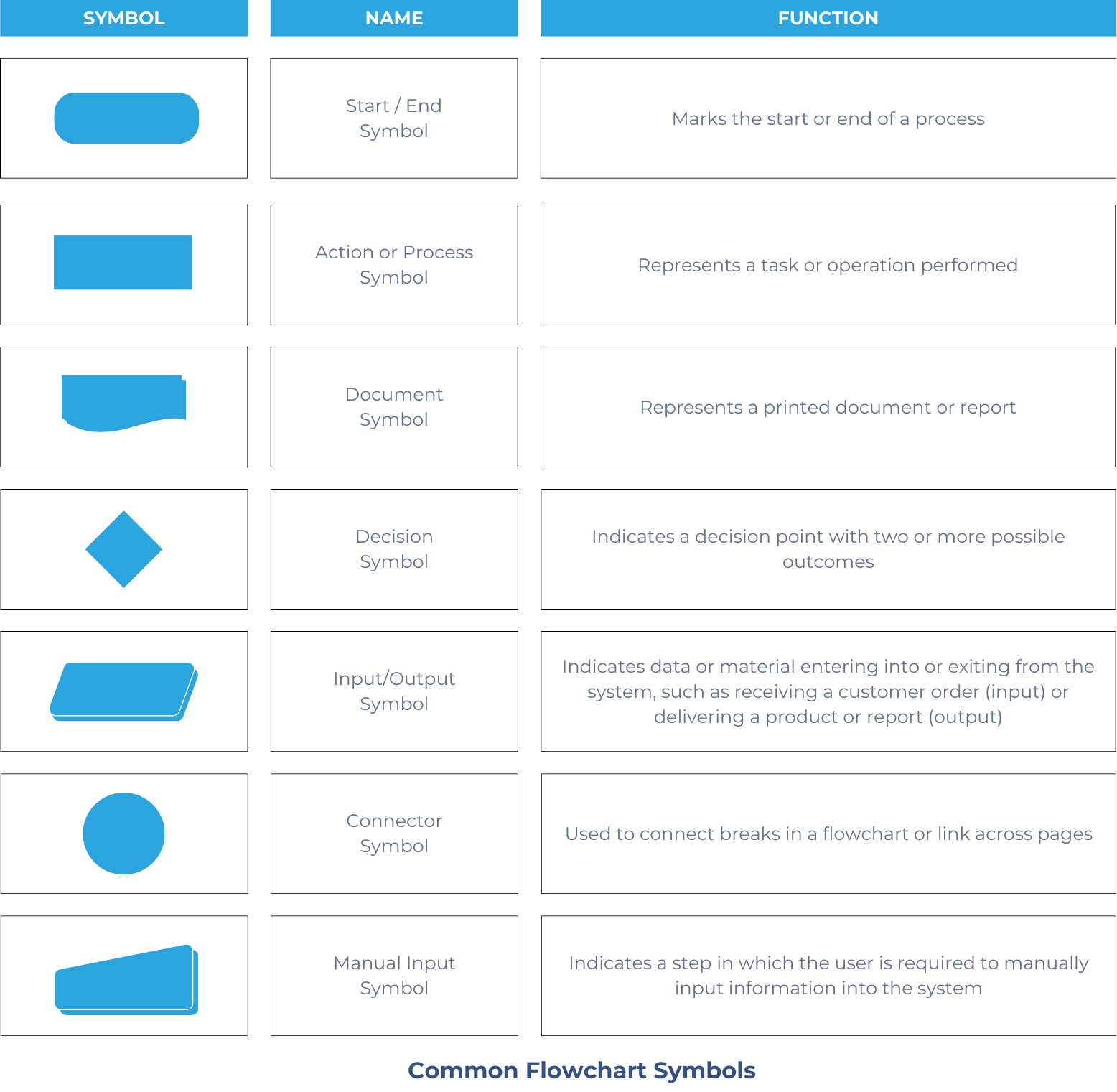
Most common flowchart symbols

The following are the most common symbols used in flowcharts:

Most common flowchart symbols

Internet security threats

  • Internet is open/shared, unlike secured private lines
  • Main risks:
    • Viruses, Trojan horses, worms (malicious code)
    • Eavesdropping/data interception (unencrypted data)
    • Phishing/social engineering (exploiting human behavior)
    • Malware/ransomware (malicious software infiltration)
    • Man-in-the-middle (MitM) attacks (intercepted communications)
    • Denial of Service (DoS) attacks (service disruption)
  • Secured lines have fewer vulnerabilities; internet use requires stronger security measures

Internet security protection

  • Management tools:
    • Firewalls (network traffic control)
    • Encryption (data protection)
    • User authentication and role-based access
    • Regular audits and activity logs

Firewall

  • Monitors, filters, and controls network traffic
  • Types: hardware, software, or both
  • Functions:
    • Blocks unauthorized access and malicious traffic
    • Controls application/internet access
    • Creates secure network zones (e.g., DMZs)
  • Often integrated with IDS and VPNs

Encryption

  • Converts data to unreadable format; requires decryption key
  • Types:
    • Public key (asymmetric): uses public/private key pair; common in SSL/TLS, email
    • Private key (symmetric): single secret key; faster, requires secure key management
  • Essential for internet data security and regulatory compliance

Flowcharts

  • Visual mapping of system steps and controls
  • Uses:
    • Identify control activities and vulnerabilities
    • Aid audit and compliance documentation
    • Facilitate communication across technical/non-technical teams
  • Standardized symbols for clarity and consistency

Sign up for free to take 20 quiz questions on this topic

Previous
Next  | 5.2.5 Backup controls and business continuity planning
All rights reserved ©2016 - 2026 Achievable, Inc.

Technology controls

Learning outcome statements

The learning outcome statements relevant for this section are:

  1. identify and describe the inherent risks of using the internet as compared to data transmissions over secured transmission lines
  2. identify means by which management can protect programs and databases from unauthorized use
  3. define data encryption and describe why there is a much greater need for data encryption methods when using the internet
  4. identify a firewall and its uses
  5. demonstrate an understanding of how flowcharts of activities are used to assess controls

Internet security threats

The internet has become an integral part of modern business operations, enabling companies to communicate, collaborate, and conduct transactions in real time across the globe. Organizations use the internet for a wide range of purposes, including online banking, e-commerce, supply chain integration, remote work platforms, and cloud computing services. These advancements have improved efficiency and scalability but have also introduced new vulnerabilities.

Unlike traditional data transmissions that rely on secured private lines, such as leased lines or virtual private networks (VPNs), the internet is an open and shared environment. This makes it inherently more susceptible to a wide variety of security threats, including:

Viruses, Trojan horses, and worms

Malicious code that can replicate, corrupt files, or create unauthorized access points in a system. Viruses often spread through infected attachments or software downloads, while Trojan horses disguise themselves as legitimate programs.

Eavesdropping and data interception

Unencrypted data transmitted over the internet can be intercepted by unauthorized parties.

Phishing and social engineering

Cybercriminals exploit human behavior to gain access to confidential information.

Malware and ransomware

Malicious software can infiltrate systems through internet downloads or unsecured connections.

Man-in-the-middle (MitM) attacks

Attackers intercept communication between two parties to steal or manipulate data.

Denial of service (DoS) attacks

Hackers can disrupt services by overwhelming systems with traffic.

These risks are significantly less prevalent when data is transmitted through secure, dedicated lines, which are more tightly controlled and monitored. However, because internet use is so widespread and cost-effective, companies must implement strong internet security measures to protect their information.

Internet security protection

Management can secure systems through the use of firewalls, encryption, user authentication mechanisms, and role-based access restrictions. Regular audits and activity logs further help detect and prevent unauthorized access or use.

Firewall

Definitions
Firewall
A network security device or software application designed to monitor, filter, and control incoming and outgoing network traffic based on predetermined security rules.

Firewalls serve as the first line of defense between an organization’s internal network and external threats from the internet.

Firewalls can be implemented as hardware, software, or a combination of both, and they function by allowing legitimate traffic and blocking unauthorized or potentially harmful data packets. Firewalls operate based on criteria such as IP addresses, port numbers, protocols, and specific keywords.

Uses of firewalls:

  • Prevent unauthorized access to internal systems and confidential data.
  • Block malicious traffic such as that associated with malware, ransomware, and phishing sites.
  • Control application usage by limiting internet access to certain applications or services.
  • Create secure zones within an organization’s network, such as internal and demilitarized zones (DMZs).

Firewalls are a foundational element of any internet security strategy and are often integrated with other tools such as intrusion detection systems (IDS) and virtual private networks (VPNs) for comprehensive protection.

Encryption

Encryption protects sensitive data by converting it into an unreadable format that can only be deciphered with the appropriate decryption key. Encryption is vital for protecting confidential data from cybercriminals and ensuring compliance with privacy regulations. There are two main types of encryption used in cybersecurity:

  • Public key encryption (asymmetric encryption): Uses a pair of keys: one public and one private. The public key encrypts data, while the private key decrypts it. The public key is available to anyone who wants to send an encrypted message to the owner of the private key. It is used to encrypt the data and can be shared freely. The private key, conversely, is kept secret and is used to decrypt the encrypted message. This method is commonly used in secure communications, such as SSL/TLS protocols for web security and email encryption.

  • Private key encryption (symmetric encryption): Uses a single secret key for both encryption and decryption. This method is faster and more efficient but requires secure key management to prevent unauthorized access. Examples include AES (Advanced Encryption Standard) and DES (Data Encryption Standard).

By leveraging both encryption techniques, organizations can ensure data security across different use cases, balancing performance with protection.

Flowcharts

Flowcharts are a powerful visual tool that bridges technical system design and internal control evaluation.

Here’s why we include flowcharts in a section on technology controls:

  1. Visual mapping of control activities: Flowcharts illustrate the steps and decision points in a system. This helps users identify where control activities (like authorizations or reconciliations) occur, or should occur.

  2. Risk identification: By showing the flow of data and actions, flowcharts highlight potential breakpoints or vulnerabilities, making it easier to spot missing controls or weak segregation of duties.

  3. Audit and compliance documentation: Auditors use flowcharts to assess whether the documented process matches actual procedures and whether risks are properly mitigated.

  4. Cross-functional communication: Flowcharts use standardized symbols, making them accessible to both technical and non-technical users. This helps IT teams, accountants, and auditors speak the same language when discussing controls.

Most common flowchart symbols

The following are the most common symbols used in flowcharts:

Key points

Internet security threats

  • Internet is open/shared, unlike secured private lines
  • Main risks:
    • Viruses, Trojan horses, worms (malicious code)
    • Eavesdropping/data interception (unencrypted data)
    • Phishing/social engineering (exploiting human behavior)
    • Malware/ransomware (malicious software infiltration)
    • Man-in-the-middle (MitM) attacks (intercepted communications)
    • Denial of Service (DoS) attacks (service disruption)
  • Secured lines have fewer vulnerabilities; internet use requires stronger security measures

Internet security protection

  • Management tools:
    • Firewalls (network traffic control)
    • Encryption (data protection)
    • User authentication and role-based access
    • Regular audits and activity logs

Firewall

  • Monitors, filters, and controls network traffic
  • Types: hardware, software, or both
  • Functions:
    • Blocks unauthorized access and malicious traffic
    • Controls application/internet access
    • Creates secure network zones (e.g., DMZs)
  • Often integrated with IDS and VPNs

Encryption

  • Converts data to unreadable format; requires decryption key
  • Types:
    • Public key (asymmetric): uses public/private key pair; common in SSL/TLS, email
    • Private key (symmetric): single secret key; faster, requires secure key management
  • Essential for internet data security and regulatory compliance

Flowcharts

  • Visual mapping of system steps and controls
  • Uses:
    • Identify control activities and vulnerabilities
    • Aid audit and compliance documentation
    • Facilitate communication across technical/non-technical teams
  • Standardized symbols for clarity and consistency

More from System controls and security measures

  • General accounting system controls
  • System development controls
  • Application and transaction controls
  • Backup controls and business continuity planning