



Quality of Service (QoS)
Sometimes a network becomes congested. When that happens, applications like voice and video can suffer because they’re sensitive to delay and packet loss. In organizations that rely on real-time communication or time-sensitive data, this can have serious business impact. For example, a financial company that needs up-to-date market data and must place trades over the internet can lose money if network performance degrades.
Most network performance problems - such as delay or packet loss (packets being dropped by routers) - happen when traffic arrives at a router interface faster than the interface can forward it. In other words, packets enter the router faster than they can exit.
By default, routers handle packets using FIFO (First In, First Out). Packets are processed in the order they arrive, using a best-effort approach. The router doesn’t distinguish between traffic types or applications, so no traffic receives preferential treatment.
That default behavior can be a problem for traffic that needs low latency, such as Voice over IP (VoIP), video for conference calls, or even control-plane traffic like OSPF and Spanning-Tree BPDUs. These packets need to be forwarded quickly and should take priority over less time-sensitive traffic like YouTube or Netflix streaming.
Routers can be configured with tools that change this default behavior so that traffic an organization considers important (business/mission critical) is prioritized. This is called Quality of Service (QoS).
When do you need QoS?
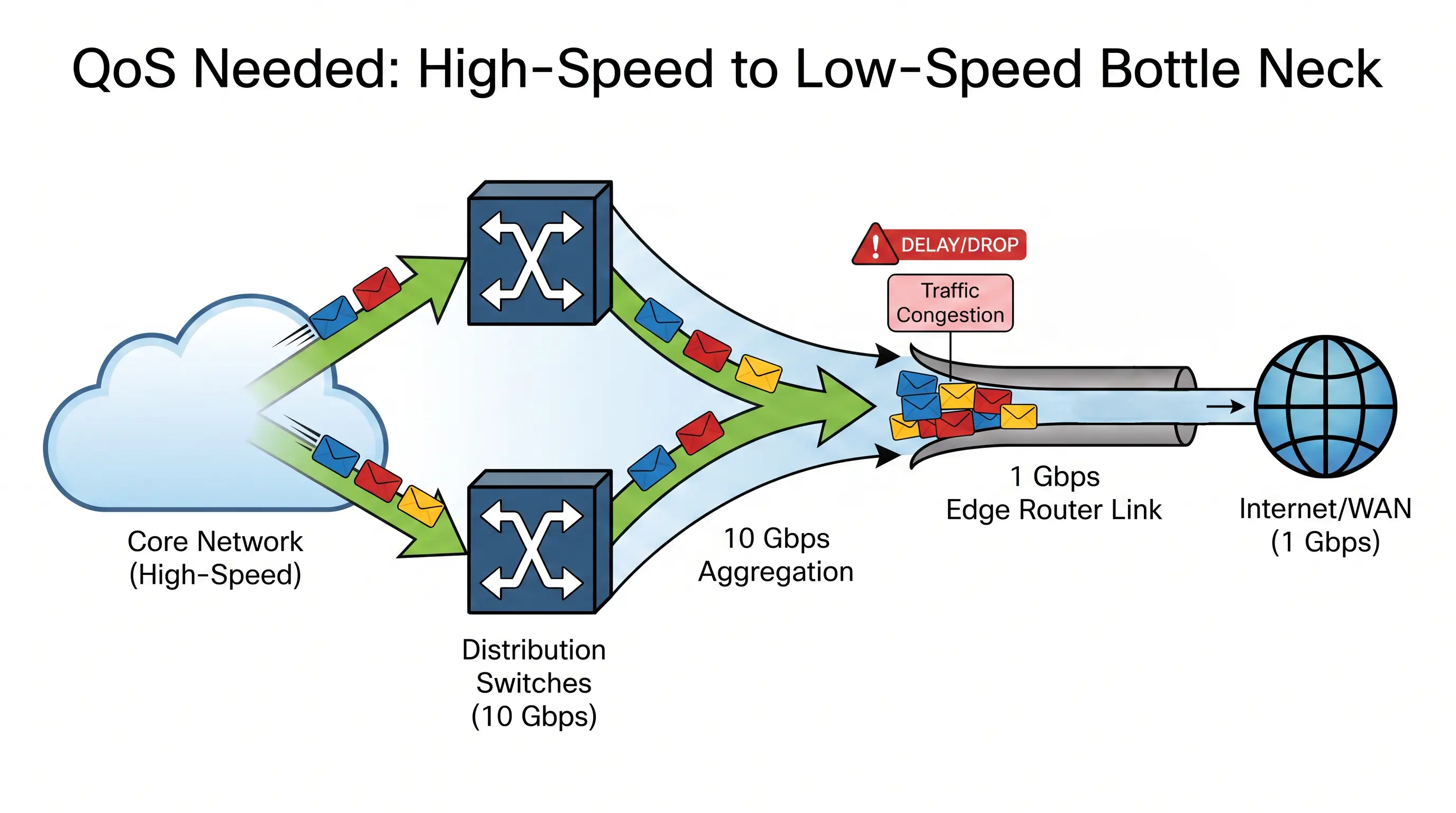
QoS isn’t always required, and not every network needs it. QoS is most useful when a high-speed part of the network funnels into an aggregation point where traffic must exit through a lower-speed interface.
A common example is traffic moving from the core of the network toward the edge.
Typically, the core of a campus network uses high-speed links (for example, 10 Gbps up to 40 Gbps). Those speeds are usually expensive from ISPs or WAN providers, so organizations often purchase slower internet/WAN links than the speeds they run internally.
When high-speed internal traffic reaches the network edge and must exit through a lower-bandwidth internet/WAN interface, a bottleneck can form. The edge router interface becomes overburdened and may start dropping packets because it can’t forward them as quickly as they arrive from the core side.
A helpful analogy is a 4-lane highway narrowing to 2 lanes - congestion is likely.
This is where QoS helps. QoS allows a router to:
- Forward important packets first
- Treat less important traffic with lower priority
- Protect business-critical traffic from being dropped
- Prevent non-critical applications (for example, Netflix streaming) from consuming too much bandwidth by rate limiting them
QoS provides the most value where traffic regularly exceeds an interface’s bandwidth. If you’re seeing frequent output drops on an interface, it may be time to configure QoS. If you have sufficient bandwidth throughout the network, QoS may not be necessary.
QoS per-hop behaviors (PHB)
The actions each router takes to handle traffic according to QoS rules are called Per-Hop Behaviors (PHB). Each router along the path can independently decide how to treat a packet based on:
- The application the packet belongs to
- Information encoded in the packet (markings)
- The QoS configuration on that router
Key components of PHB include classification, marking, queuing, congestion avoidance, and policing/shaping.
Classification
When a QoS-enabled router receives a packet, it examines the packet to decide whether it should apply any QoS action. This decision is based on how the router classifies the packet.
Classification often uses fields such as:
- IP addresses
- Protocol (TCP/UDP)
- TCP or UDP port numbers
Classification is commonly performed at the host’s default gateway (if it supports QoS). A typical method is to use an ACL to match specific packet fields and then classify the traffic accordingly.
For example, an ACL might express the logic: “If a packet has a TCP destination port of 80, classify it as web traffic.”
Marking
After traffic is classified, the next step is to encode information into the packet so that other QoS-enabled routers along the path know how to treat it. This is called marking.
Marking is useful because it reduces the need for every router to re-classify traffic with ACLs. Instead, routers can look at the marking and apply the appropriate behavior.
These markings are carried end-to-end - from the router connected to the source host to the router connected to the destination host.
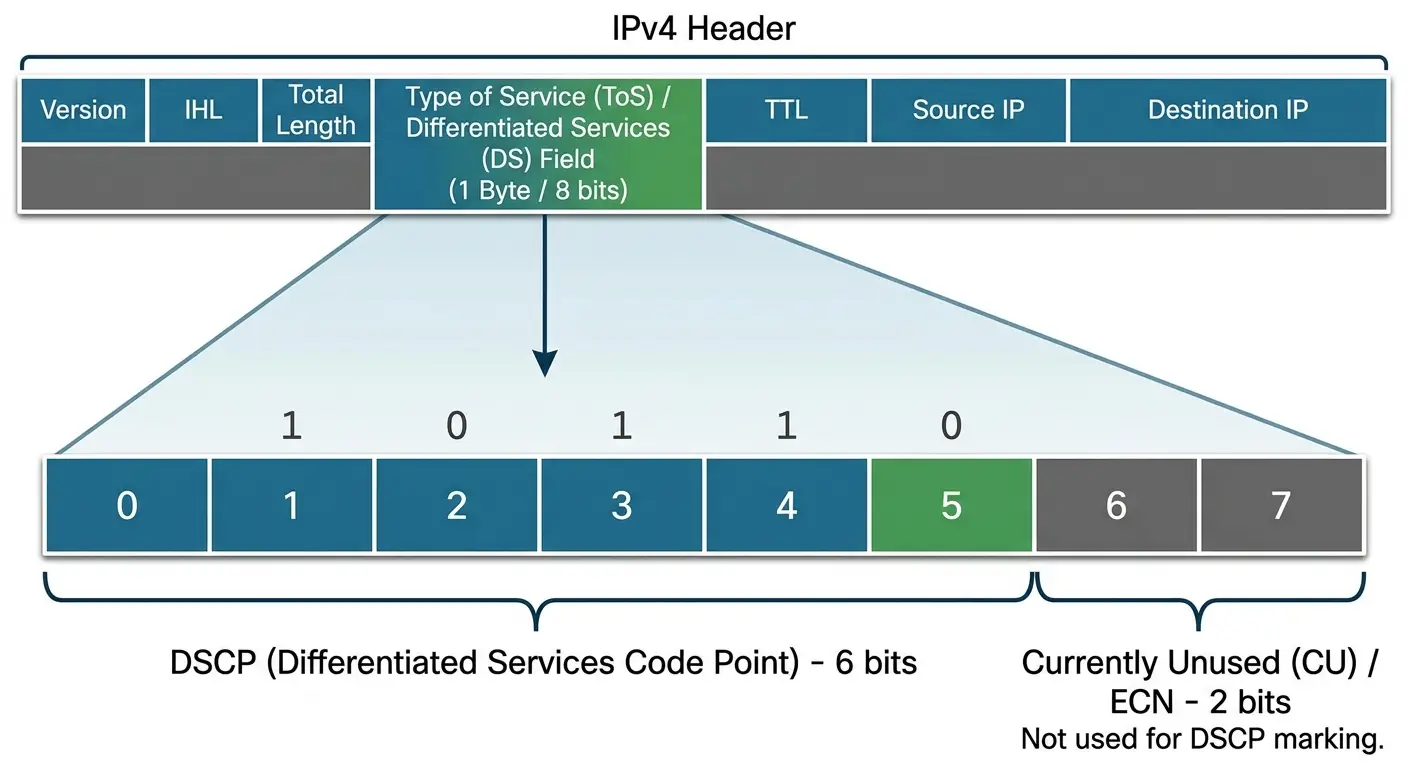
At Layer 3, the marking value is called a Differentiated Services Code Point (DSCP) value. DSCP uses bits in a field inside the IP packet that was repurposed for QoS: the Type of Service (ToS) field, which is 1 Byte (8 bits) in the IP header.
DSCP uses 6 bits in this field (the first two bits are not used for DSCP). Different bit patterns represent different DSCP values, and routers can use those values to decide how to prioritize traffic.
You can define your own priority scheme, but there are also widely accepted industry-standard DSCP values. For example, VoIP traffic is delay-sensitive and is typically marked with DSCP decimal 46, which is 101110 in binary.
DSCP 46 also has a name: Expedited Forwarding (EF). This marking is typically reserved for VoIP and is treated as the highest priority.
Queuing
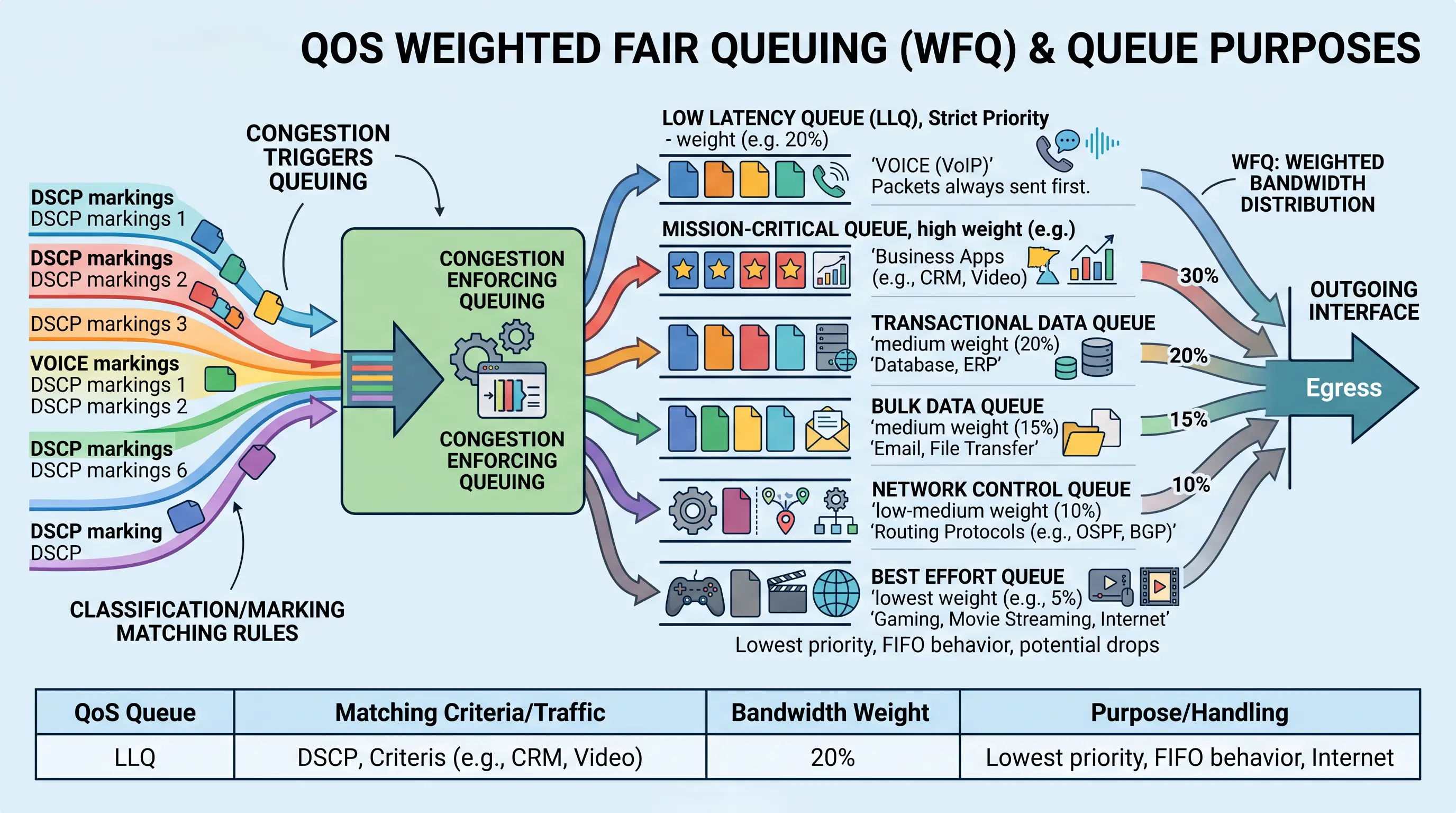
Once a router can identify traffic priority (for example, by DSCP marking), it needs a way to decide which packets to send first when the interface is congested. Queuing is the process of holding packets in queues and scheduling when they are transmitted based on priority. Queues are applied to a router interface.
Weighted fair queuing (WFQ)
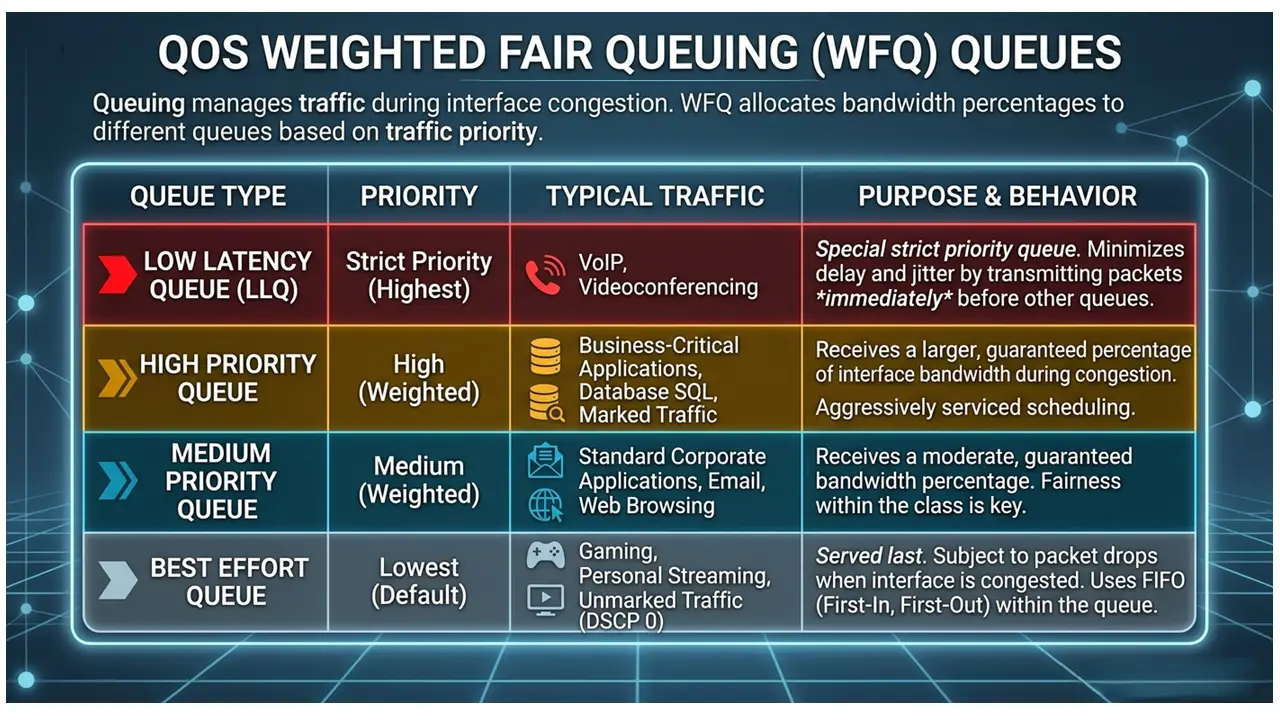
With Weighted Fair Queuing (WFQ), you can create multiple queues and allocate each queue a percentage of the interface bandwidth. Packets are placed into queues based on how they match your classification/marking rules (for example, DSCP values). Higher-priority queues are serviced more aggressively according to their assigned “weight.”
Low latency queuing (LLQ)
For VoIP traffic, there is a special queue called the Low Latency Queue (LLQ). Packets in this queue are always transmitted before any other packets.
Best effort queue
Traffic that isn’t business-critical and shouldn’t consume much bandwidth (for example, gaming or movie streaming) is typically placed in the Best Effort Queue. These packets typically are not marked with any DSCP markings.
This queue is called “best effort” because it generally follows FIFO behavior within the queue:
- Packets are processed in the order they arrive.
- If there isn’t enough bandwidth available, packets are dropped.
This queue has the lowest priority.
Congestion avoidance
A router can also be configured to proactively discard packets to reduce the chance of sustained congestion. A common congestion avoidance mechanism is Weighted Random Early Detection (WRED).
For example, if a router notices packets from a TCP session building up in a queue, it may begin discarding some packets to slow the sender down. WRED randomly discards packets, typically starting with lower-priority traffic before higher-priority traffic.
Policing and shaping
You can rate limit traffic on an interface using two PHB methods: policing and shaping. Both control the transmission rate, but they handle excess traffic differently.
Policing
With policing, you set a bandwidth limit over a time interval (often per second). For example, you might limit traffic to 100 Mbps.
Policing enforces the limit by dropping packets that exceed it, keeping the traffic rate at or below the configured value. You can apply policing:
- Inbound (as packets enter the interface)
- Outbound (as packets exit the interface)
ISPs commonly use policing to ensure customers don’t exceed the bandwidth tier they purchased. Policing can also remark packets by changing DSCP values to a lower-priority marking.
Shaping
Shaping also enforces a configured rate, but instead of dropping excess packets, it buffers any packets that exceed the bandwidth limit and transmits them later when bandwidth is available.
Shaping smooths traffic bursts and controls the transmission rate while minimizing packet loss. Buffered packets are still scheduled based on priority, so higher-priority traffic is sent before lower-priority traffic.
Shaping can only be applied outbound on a router interface.