



Enterprise Resource Planning (ERP)
Learning outcome statements
The learning outcome statements relevant for this section are:
- define ERP and identify and explain the advantages and disadvantages of ERP
- explain how ERP helps overcome the challenges of separate financial and nonfinancial systems, integrating all aspects of an organization’s activities
- define relational database and demonstrate an understanding of a database management system
- define data warehouse and data mart
What is enterprise resource planning (ERP)
ERP systems consolidate financial, operational, and human resources data into a unified database, ensuring real-time access to accurate information for decision-making.
When financial and non-financial data are kept in separate systems, several problems tend to show up: the same data may need to be entered more than once in different departments, records from different systems don’t always match and have to be reconciled by hand, information arrives late or in fragments with no single enterprise-wide view, and the separate systems often can’t share data with each other at all. ERP addresses these problems with one shared database: each transaction is entered once and immediately updates every module it affects. For example, recording a sale automatically updates inventory, accounts receivable, and the general ledger at the same time, instead of requiring separate entries in separate systems.
Unlike an accounting information system (AIS) - which focuses mainly on processing an organization’s financial transactions - ERP systems integrate both financial and non-financial information. This allows businesses to analyze a more comprehensive dataset that includes operational metrics, customer interactions, supply chain performance, and other business-critical insights. By consolidating financial and non-financial data, ERP enhances decision-making, improves forecasting accuracy, and fosters cross-departmental collaboration.
Advantages of ERP
- Improved efficiency: ERP streamlines business processes by reducing manual tasks and automating workflows.
- Data integration: A centralized database ensures consistency and accuracy of data across departments.
- Better decision-making: Real-time reporting and analytics provide management with valuable insights for strategic planning.
- Regulatory compliance: ERP systems can include controls, audit trails, and standardized processes that support regulatory compliance.
- Scalability: As organizations grow, ERP systems can be expanded to accommodate increased operations.
Disadvantages of ERP
- High implementation costs: Deploying an ERP system requires significant financial investment.
- Complexity: Customizing and integrating ERP solutions with existing processes can be challenging.
- Lengthy implementation process: The transition to an ERP system may take months or even years to complete.
- Training requirements: Employees must be trained to effectively use the system, which can be time-consuming.
- Data security issues: ERP systems store large amounts of sensitive financial and operational data, making them attractive targets for cyber threats. Organizations must implement robust security measures to protect against data breaches, unauthorized access, and system vulnerabilities.
Database management systems (DBMS) and ERP
A DBMS is essential for managing the vast amounts of data processed by ERP systems. ERP systems rely on a DBMS to handle data from various departments, including finance, human resources, supply chain, and customer relations, allowing for seamless integration of information. A DBMS typically includes a data dictionary describing every data element, a query language (most commonly SQL) for retrieving and changing data, and security and concurrency controls that determine who can access or update records.
Most ERP systems use a relational database, managed by a relational DBMS (RDBMS). A relational database organizes data into tables with predefined relationships, making it easier to retrieve and analyze data efficiently. This structure allows ERP systems to integrate various business functions by linking data across departments in a logical and structured manner.
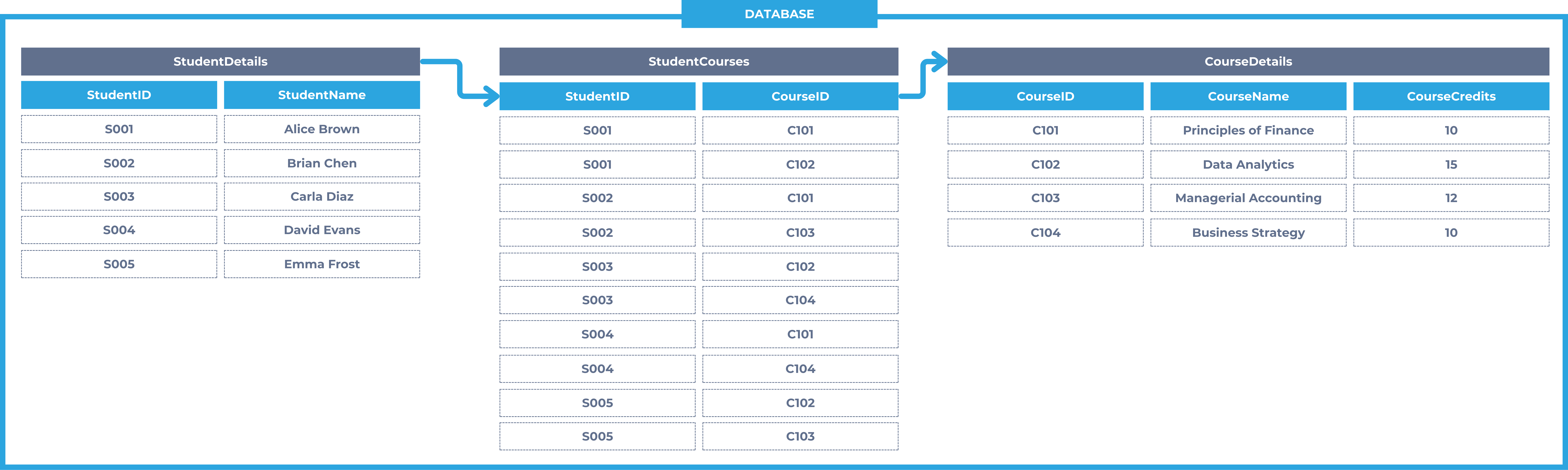
For example, a relational database in a university system might connect student records, enrolled courses, and course details. Each student is stored once in the student table, their enrollments are tracked in a separate table, and course information is maintained in the course table. Each table has a primary key - a field that uniquely identifies each record, such as student ID - and a foreign key is a field in one table that matches the primary key of another table, which is how tables are linked. By linking these tables through shared keys, the database ensures that updates in one area (such as a student registering for a new course) automatically reflect in related areas (like their enrollment list and the course roster).
By utilizing a DBMS, ERP systems enhance data accuracy, streamline reporting, and enable real-time decision-making, making them a crucial component of modern business operations.
Data storage
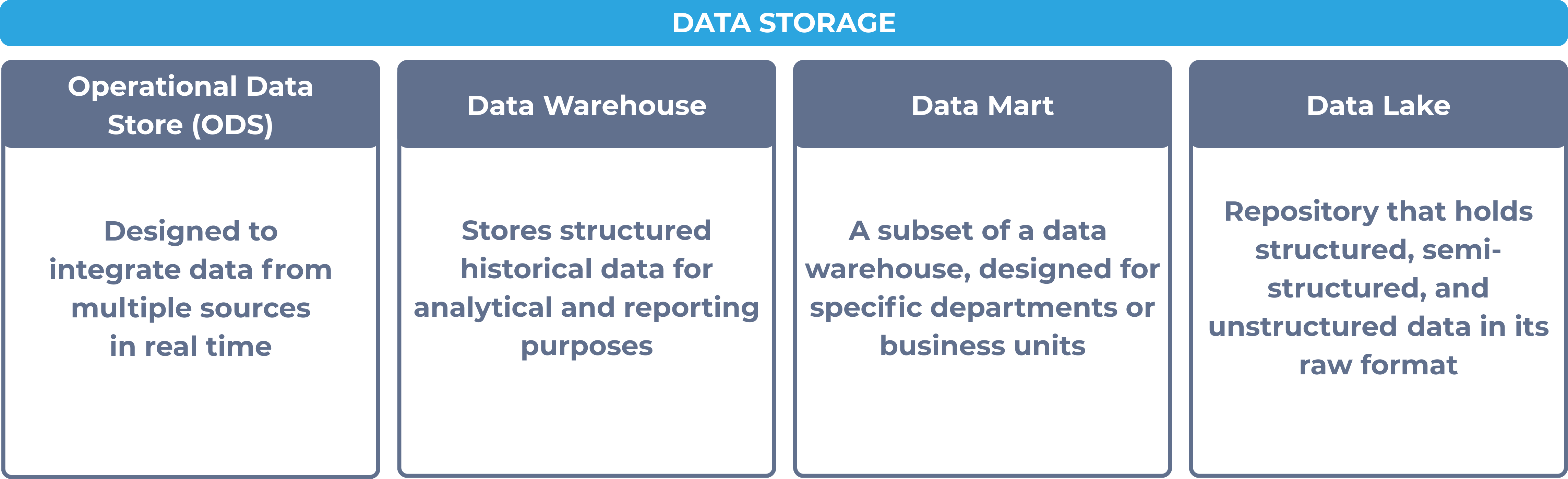
Efficient data storage is critical for ERP systems, ensuring that organizations can manage vast amounts of structured and unstructured data effectively. Different types of data storage solutions serve various purposes in ERP systems, including:
- Operational data stores (ODS)
- Data warehouses
- Data marts, and
- Data lakes
Data warehouse
A data warehouse is a large repository that stores structured historical data for analytical and reporting purposes. Data is extracted from various transactional systems, transformed, and loaded into the warehouse through an extract, transform, load (ETL) process, so it’s ready for complex queries, trend analysis, and business intelligence. A data warehouse differs from an operational data store (ODS), a centralized database that integrates current, real-time data from operational systems to support day-to-day reporting rather than long-term historical analysis.
Data mart
A data mart is a smaller, department-focused data store - for example, one built for finance, sales, or human resources - that enables quicker, more targeted data retrieval than querying an entire data warehouse. A dependent data mart is a subset drawn from the enterprise data warehouse, while an independent data mart is built directly from source systems without a central warehouse in place.
A data lake, by contrast, stores structured, semi-structured, and unstructured data in raw form without a predefined schema, giving data scientists and analysts the flexibility to process the data as needed for big data analytics, machine learning, and artificial intelligence applications.
The following table compares the four data storage types by data structure, time horizon, scope, and primary use.
| Store | Data structure | Time horizon | Scope | Primary use |
|---|---|---|---|---|
| Operational data store (ODS) | Structured, integrated from operational systems | Current / near real-time only | Enterprise-wide | Day-to-day operational reporting |
| Data warehouse | Structured | Historical | Enterprise-wide | Analytical processing and business intelligence |
| Data mart | Structured | Historical | Single department or function | Targeted, department-level reporting |
| Data lake | Structured, semi-structured, and unstructured (raw) | Current and historical | Enterprise-wide | Big data analytics, machine learning, and AI |