


This browser is too old to run Achievable.

Update it, or open this page in a current version of Chrome, Safari, Firefox or Edge. On an iPhone or iPad, update iOS: every browser there runs on the version of Safari that comes with it.

Achievable logoAchievable logo
CMA Part 1
Sign in
Sign up
Purchase
Textbook
Practice exams
Support
How it works
Resources
Exam catalog
Mountain with a flag at the peak
Textbook
Introduction
1. External financial reporting decisions
2. Planning, budgeting, and forecasting
3. Performance management
4. Cost management
5. Internal control
5.1 Governance, risk and compliance
5.2 System controls and security measures
5.2.1 General accounting system controls
5.2.2 System development controls
5.2.3 Application and transaction controls
5.2.4 Technology controls
5.2.5 Backup controls and business continuity planning
6. Technology and analytics
Wrapping up
Achievable logoAchievable logo
5.2.3 Application and transaction controls
Achievable CMA Part 1
5. Internal control
5.2. System controls and security measures
Our CMA Part 1 course is currently in development and is a work-in-progress.

Application and transaction controls

7 min read
Font
Discuss
Share
Feedback

Learning outcome statements

The learning outcome statements relevant for this section are:

  1. identify input controls, processing controls, and output controls and describe why each of these controls is necessary

Introduction

Definitions
Application controls
Controls that are designed to ensure the integrity, accuracy, and validity of data as it is input, processed, and output through the system. These controls are specific to individual programs or transactions and are designed to prevent and detect errors or fraud at the transaction level.

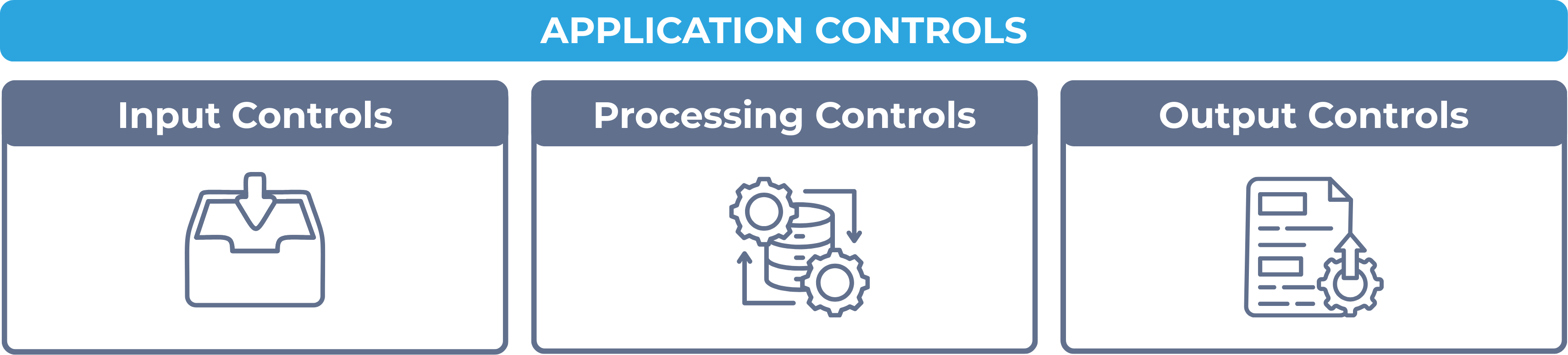
Application controls are typically categorized into three main types:

  • Input controls – to ensure the accuracy, completeness, and validity of data entered into the system
  • Processing controls – to ensure that data is processed correctly and completely
  • Output controls – to ensure that system outputs are accurate, distributed securely, and used appropriately
Application controls
Achievable

While application and transaction controls focus on specific transaction flows and individual systems, general controls (discussed in the previous chapter) are broader and support the overall functioning and security of IT environments.

Example: A payroll batch

A company processes a weekly payroll batch of 50 employees.

  • Input: As timecards are entered, the system records a record count (50) and a hash total (the sum of the 50 employee ID numbers) so later stages can confirm no records were added or lost. A range check also rejects any timecard showing more than 24 hours in a day.
  • Processing: After payroll is calculated, a run-to-run total confirms that 50 records are still present and that the batch’s hash total hasn’t changed - if a record were dropped or altered during processing, the totals wouldn’t match.
  • Output: The payroll register’s total is reconciled back to the batch total carried from input, and the report is distributed only to authorized payroll and HR staff.

Answer: Each stage’s control catches a different kind of error: input controls catch bad data at entry, processing controls confirm nothing was lost or changed during calculation, and output controls confirm the final report is both accurate and reaches only authorized people.

Input controls

Definitions
Input controls
Mechanisms designed to provide reasonable assurance that data entered into an information system is accurate, complete, valid, and authorized.

Input controls catch data entry errors, omissions, or fraudulent inputs before they can compromise the integrity of the system’s output.

Input controls can be both manual and automated, and are tailored to the nature of the input process. They are essential because once incorrect data is entered and accepted by the system, it can be difficult to detect and may affect downstream processing and reporting.

Examples of input controls

  1. Field validation checks: These ensure that only data of the correct type, length, or format can be entered into each field. For example, a date field may only accept entries in the format “MM/DD/YYYY,” and a numeric field will reject alphabetic characters.
  2. Pre-numbered forms: These are used to prevent duplicate or missing entries by assigning sequential numbers to documents like invoices or purchase orders. When a sequence is broken, the system or user is alerted to a potential error or omission.
  3. Drop-down menus and selection lists: Limit input to predefined choices, reducing variability and preventing data entry errors (e.g., selecting from a list of approved departments).
  4. Edit checks (including range/limit checks): Edit checks are the umbrella term for programmed tests applied to data as it’s entered - format checks, validity checks, completeness checks, range/limit checks, check-digit checks, and closed-loop (key) verification. For example, a range check rejects salary entries outside $30,000–$300,000 or negative invoice amounts. Field validation (item 1) and mandatory fields (item 5) are themselves types of edit checks.
  5. Mandatory fields: Require certain fields to be filled out before the form can be submitted, ensuring completeness of data (e.g., account number or transaction date).
  6. Batch totals and hash totals: Confirm that a batch of data wasn’t altered during entry. A financial total sums a meaningful field, such as the total dollar amount of a payroll batch; a record count counts the number of documents, such as the number of timecards; a hash total sums a field that has no meaningful total, such as employee ID numbers, purely to detect missing or altered records.
  7. System access controls for input screens: Restrict who can enter or modify specific types of input data, based on user roles or approval levels.

Why input controls are necessary

Input controls stop erroneous or fraudulent data from ever entering the system, which keeps downstream processing and financial reporting reliable.

Processing controls

Definitions
Processing controls
Procedures designed to provide reasonable assurance that data is processed accurately, completely, and in a timely manner as it moves through various stages of an information system.

Processing controls detect and prevent errors during the transformation of input into output, and are essential for maintaining the integrity of system-generated data.

Processing controls operate within both batch and real-time environments and may be automated within software or performed manually. They monitor the flow of data through the system and ensure that the processes function as intended.

Examples of processing controls

  1. Run-to-run totals: These verify that data totals (e.g., number of transactions or financial amounts) remain consistent from one processing stage to the next.
  2. Control totals: Re-verify the batch and hash totals established at input, confirming that no records were lost or altered during processing.
  3. Sequence checks: Ensure that records are processed in the correct order and that no transactions are missing or duplicated.
  4. Error detection and exception reports: Automatically flag anomalies, incorrect data, or processing exceptions for review and correction, typically through system-generated exception reports.
  5. Recalculation checks: Recompute formulas or logic during processing to verify that calculations are performed correctly.
  6. Reasonableness checks: Evaluate processed results against expected norms (e.g., gross margins or transaction volumes) to flag anomalies.
  7. Audit trails: Record every step of data processing, enabling traceability and accountability.
  8. Redundant processing (dual systems): Critical systems may be run in parallel for reconciliation to ensure reliability and accuracy.

Why processing controls are necessary

Processing controls catch errors or malfunctions during calculation before they reach the output stage, and confirm that business rules and compliance requirements are applied consistently.

Output controls

Definitions
Output controls
Procedures and safeguards designed to provide reasonable assurance that data output from an information system is accurate, complete, distributed only to authorized individuals, and used appropriately.

Output controls apply after processing is complete, checking that system-generated reports, documents, and communications are reliable and secure.

Examples of output controls

  1. Reconciliation of output to input totals: Verifies that the number of records and totals in output reports match those from earlier processing stages.
  2. Distribution and access controls: Role-based authentication restricts who can generate, retrieve, or receive reports, so sensitive information reaches only authorized individuals.
  3. Error reporting and exception logs: Flag missing, incomplete, or anomalous output records for investigation.
  4. Print controls: Limit or restrict who can print reports, often requiring secure login or printer location.
  5. Electronic output encryption: Ensures that digital files sent via email or other networks are encrypted to protect confidentiality.
  6. Audit trails for report access: Track who accessed, viewed, or downloaded system outputs.
  7. Archiving procedures: Ensure that important outputs (e.g., financial statements, regulatory reports) are retained securely and can be retrieved when needed.
  8. Version control of reports: Prevents outdated or incorrect versions of outputs from being used.

Why output controls are necessary

Output controls protect the integrity and confidentiality of reports, preventing flawed or incomplete data from reaching decision-makers and keeping sensitive information out of unauthorized hands.

Application Controls Overview

  • Ensure integrity, accuracy, validity of data at transaction/program level (vs. broader general controls)
  • Three types: input, processing, output controls
  • Payroll example: input checks data entry, processing confirms nothing lost/altered, output confirms accuracy + restricted distribution

Input Controls

  • Definition: ensure data entered is accurate, complete, valid, authorized
  • Catch errors before they corrupt downstream processing; can be manual or automated
  • Key examples:
    • Field validation checks (correct type/format/length)
    • Pre-numbered forms (detect missing/duplicate entries)
    • Drop-down menus/selection lists
    • Edit checks (umbrella term: format, validity, completeness, range/limit, check-digit, closed-loop verification)
    • Mandatory fields
    • Batch totals: financial total (sum of meaningful field), record count (number of documents), hash total (sum of non-meaningful field, e.g. IDs, to detect alteration)
    • System access controls on input screens

Processing Controls

  • Definition: ensure data processed accurately, completely, timely as it moves through system
  • Work in batch or real-time; detect errors during data transformation
  • Key examples:
    • Run-to-run totals and control totals (re-verify batch/hash totals from input)
    • Sequence checks (correct order, no missing/duplicate records)
    • Error detection/exception reports
    • Recalculation checks (verify formula/logic accuracy)
    • Reasonableness checks (compare results to expected norms)
    • Audit trails (traceability)
    • Redundant/parallel processing for reconciliation
  • Necessary to catch calculation errors before output and ensure consistent business rule application

Output Controls

  • Definition: ensure output is accurate, complete, securely distributed, and used appropriately
  • Applied after processing completes
  • Key examples:
    • Reconciliation of output totals to input/processing totals
    • Distribution/access controls (role-based authentication)
    • Error reporting and exception logs
    • Print controls (restrict who can print)
    • Encryption of electronic output
    • Audit trails for report access
    • Archiving procedures (secure retention/retrieval)
    • Version control (prevent outdated reports from being used)
  • Necessary to protect data integrity/confidentiality and ensure decision-makers get accurate, authorized information

Sign up for free to take 22 quiz questions on this topic

Previous
Next  | 5.2.4 Technology controls
All rights reserved ©2016 - 2026 Achievable, Inc.

Application and transaction controls

Learning outcome statements

The learning outcome statements relevant for this section are:

  1. identify input controls, processing controls, and output controls and describe why each of these controls is necessary

Introduction

Definitions
Application controls
Controls that are designed to ensure the integrity, accuracy, and validity of data as it is input, processed, and output through the system. These controls are specific to individual programs or transactions and are designed to prevent and detect errors or fraud at the transaction level.

Application controls are typically categorized into three main types:

  • Input controls – to ensure the accuracy, completeness, and validity of data entered into the system
  • Processing controls – to ensure that data is processed correctly and completely
  • Output controls – to ensure that system outputs are accurate, distributed securely, and used appropriately

While application and transaction controls focus on specific transaction flows and individual systems, general controls (discussed in the previous chapter) are broader and support the overall functioning and security of IT environments.

Example: A payroll batch

A company processes a weekly payroll batch of 50 employees.

  • Input: As timecards are entered, the system records a record count (50) and a hash total (the sum of the 50 employee ID numbers) so later stages can confirm no records were added or lost. A range check also rejects any timecard showing more than 24 hours in a day.
  • Processing: After payroll is calculated, a run-to-run total confirms that 50 records are still present and that the batch’s hash total hasn’t changed - if a record were dropped or altered during processing, the totals wouldn’t match.
  • Output: The payroll register’s total is reconciled back to the batch total carried from input, and the report is distributed only to authorized payroll and HR staff.

Answer: Each stage’s control catches a different kind of error: input controls catch bad data at entry, processing controls confirm nothing was lost or changed during calculation, and output controls confirm the final report is both accurate and reaches only authorized people.

Input controls

Definitions
Input controls
Mechanisms designed to provide reasonable assurance that data entered into an information system is accurate, complete, valid, and authorized.

Input controls catch data entry errors, omissions, or fraudulent inputs before they can compromise the integrity of the system’s output.

Input controls can be both manual and automated, and are tailored to the nature of the input process. They are essential because once incorrect data is entered and accepted by the system, it can be difficult to detect and may affect downstream processing and reporting.

Examples of input controls

  1. Field validation checks: These ensure that only data of the correct type, length, or format can be entered into each field. For example, a date field may only accept entries in the format “MM/DD/YYYY,” and a numeric field will reject alphabetic characters.
  2. Pre-numbered forms: These are used to prevent duplicate or missing entries by assigning sequential numbers to documents like invoices or purchase orders. When a sequence is broken, the system or user is alerted to a potential error or omission.
  3. Drop-down menus and selection lists: Limit input to predefined choices, reducing variability and preventing data entry errors (e.g., selecting from a list of approved departments).
  4. Edit checks (including range/limit checks): Edit checks are the umbrella term for programmed tests applied to data as it’s entered - format checks, validity checks, completeness checks, range/limit checks, check-digit checks, and closed-loop (key) verification. For example, a range check rejects salary entries outside $30,000–$300,000 or negative invoice amounts. Field validation (item 1) and mandatory fields (item 5) are themselves types of edit checks.
  5. Mandatory fields: Require certain fields to be filled out before the form can be submitted, ensuring completeness of data (e.g., account number or transaction date).
  6. Batch totals and hash totals: Confirm that a batch of data wasn’t altered during entry. A financial total sums a meaningful field, such as the total dollar amount of a payroll batch; a record count counts the number of documents, such as the number of timecards; a hash total sums a field that has no meaningful total, such as employee ID numbers, purely to detect missing or altered records.
  7. System access controls for input screens: Restrict who can enter or modify specific types of input data, based on user roles or approval levels.

Why input controls are necessary

Input controls stop erroneous or fraudulent data from ever entering the system, which keeps downstream processing and financial reporting reliable.

Processing controls

Definitions
Processing controls
Procedures designed to provide reasonable assurance that data is processed accurately, completely, and in a timely manner as it moves through various stages of an information system.

Processing controls detect and prevent errors during the transformation of input into output, and are essential for maintaining the integrity of system-generated data.

Processing controls operate within both batch and real-time environments and may be automated within software or performed manually. They monitor the flow of data through the system and ensure that the processes function as intended.

Examples of processing controls

  1. Run-to-run totals: These verify that data totals (e.g., number of transactions or financial amounts) remain consistent from one processing stage to the next.
  2. Control totals: Re-verify the batch and hash totals established at input, confirming that no records were lost or altered during processing.
  3. Sequence checks: Ensure that records are processed in the correct order and that no transactions are missing or duplicated.
  4. Error detection and exception reports: Automatically flag anomalies, incorrect data, or processing exceptions for review and correction, typically through system-generated exception reports.
  5. Recalculation checks: Recompute formulas or logic during processing to verify that calculations are performed correctly.
  6. Reasonableness checks: Evaluate processed results against expected norms (e.g., gross margins or transaction volumes) to flag anomalies.
  7. Audit trails: Record every step of data processing, enabling traceability and accountability.
  8. Redundant processing (dual systems): Critical systems may be run in parallel for reconciliation to ensure reliability and accuracy.

Why processing controls are necessary

Processing controls catch errors or malfunctions during calculation before they reach the output stage, and confirm that business rules and compliance requirements are applied consistently.

Output controls

Definitions
Output controls
Procedures and safeguards designed to provide reasonable assurance that data output from an information system is accurate, complete, distributed only to authorized individuals, and used appropriately.

Output controls apply after processing is complete, checking that system-generated reports, documents, and communications are reliable and secure.

Examples of output controls

  1. Reconciliation of output to input totals: Verifies that the number of records and totals in output reports match those from earlier processing stages.
  2. Distribution and access controls: Role-based authentication restricts who can generate, retrieve, or receive reports, so sensitive information reaches only authorized individuals.
  3. Error reporting and exception logs: Flag missing, incomplete, or anomalous output records for investigation.
  4. Print controls: Limit or restrict who can print reports, often requiring secure login or printer location.
  5. Electronic output encryption: Ensures that digital files sent via email or other networks are encrypted to protect confidentiality.
  6. Audit trails for report access: Track who accessed, viewed, or downloaded system outputs.
  7. Archiving procedures: Ensure that important outputs (e.g., financial statements, regulatory reports) are retained securely and can be retrieved when needed.
  8. Version control of reports: Prevents outdated or incorrect versions of outputs from being used.

Why output controls are necessary

Output controls protect the integrity and confidentiality of reports, preventing flawed or incomplete data from reaching decision-makers and keeping sensitive information out of unauthorized hands.

Key points

Application Controls Overview

  • Ensure integrity, accuracy, validity of data at transaction/program level (vs. broader general controls)
  • Three types: input, processing, output controls
  • Payroll example: input checks data entry, processing confirms nothing lost/altered, output confirms accuracy + restricted distribution

Input Controls

  • Definition: ensure data entered is accurate, complete, valid, authorized
  • Catch errors before they corrupt downstream processing; can be manual or automated
  • Key examples:
    • Field validation checks (correct type/format/length)
    • Pre-numbered forms (detect missing/duplicate entries)
    • Drop-down menus/selection lists
    • Edit checks (umbrella term: format, validity, completeness, range/limit, check-digit, closed-loop verification)
    • Mandatory fields
    • Batch totals: financial total (sum of meaningful field), record count (number of documents), hash total (sum of non-meaningful field, e.g. IDs, to detect alteration)
    • System access controls on input screens

Processing Controls

  • Definition: ensure data processed accurately, completely, timely as it moves through system
  • Work in batch or real-time; detect errors during data transformation
  • Key examples:
    • Run-to-run totals and control totals (re-verify batch/hash totals from input)
    • Sequence checks (correct order, no missing/duplicate records)
    • Error detection/exception reports
    • Recalculation checks (verify formula/logic accuracy)
    • Reasonableness checks (compare results to expected norms)
    • Audit trails (traceability)
    • Redundant/parallel processing for reconciliation
  • Necessary to catch calculation errors before output and ensure consistent business rule application

Output Controls

  • Definition: ensure output is accurate, complete, securely distributed, and used appropriately
  • Applied after processing completes
  • Key examples:
    • Reconciliation of output totals to input/processing totals
    • Distribution/access controls (role-based authentication)
    • Error reporting and exception logs
    • Print controls (restrict who can print)
    • Encryption of electronic output
    • Audit trails for report access
    • Archiving procedures (secure retention/retrieval)
    • Version control (prevent outdated reports from being used)
  • Necessary to protect data integrity/confidentiality and ensure decision-makers get accurate, authorized information

More from System controls and security measures

  • General accounting system controls
  • System development controls
  • Technology controls
  • Backup controls and business continuity planning