


Achievable logoAchievable logo
CCNA
Sign in
Sign up
Purchase
Textbook
Practice exams
Support
How it works
Exam catalog
Mountain with a flag at the peak
Textbook
Introduction
1. Introduction to networking
2. Administering Ethernet LANs
3. IP connectivity
4. Network services
5. IPv6
6. Wireless networking
7. Network management and administering network devices
8. Network security fundamentals
8.1 Fundamental network security concepts
8.2 Securing access to Cisco network devices
8.3 Firewalls and Intrusion Prevention Systems (IPS)
8.4 Virtual Private Networks (VPNs)
8.5 Layer 2 security features
8.5.1 Port security
8.5.2 DHCP Snooping and Dynamic ARP Inspection (DAI)
9. Network automation and programmability
Wrapping up
Achievable logoAchievable logo
8.5.2 DHCP Snooping and Dynamic ARP Inspection (DAI)
Achievable CCNA
8. Network security fundamentals
8.5. Layer 2 security features
Our CCNA course is currently in development and is a work-in-progress.

DHCP Snooping and Dynamic ARP Inspection (DAI)

6 min read
Font
Discuss
Share
Feedback

As we discussed in Chapter 4.3 Dynamic Host Configuration Protocol (DHCP), DHCP dynamically assigns IP addresses to PCs. PCs use DHCP to obtain an IP address so they can participate in a TCP/IP-based network (for example, the Internet).

However, as we discussed in Chapter 8.1 Fundamental network security concepts, DHCP spoofing is a form of “man-in-the-middle” attack.

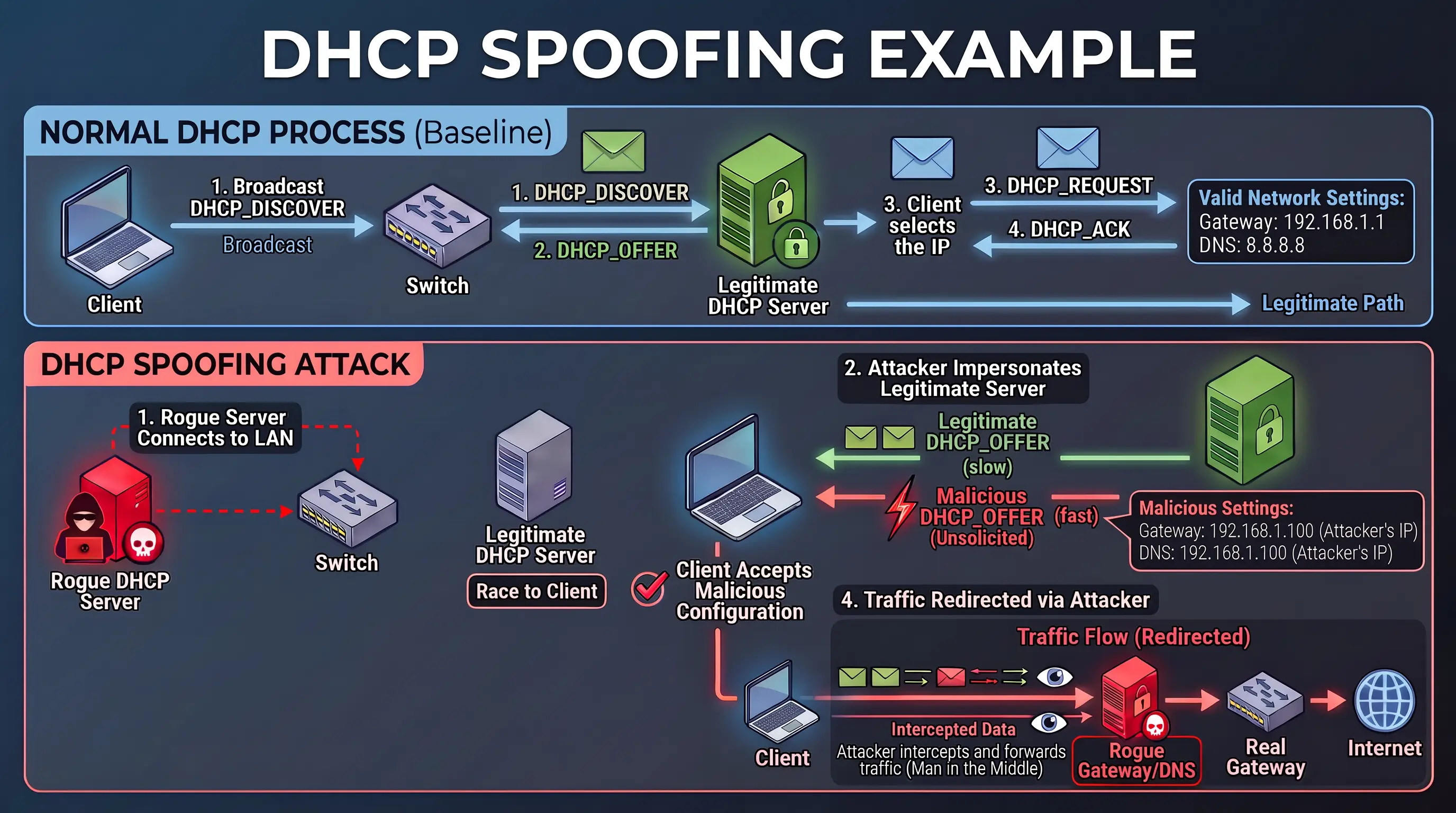
In a typical DHCP spoofing scenario:

  • A rogue DHCP server is physically connected to your LAN.
  • It impersonates a legitimate DHCP server by sending unsolicited DHCP_OFFER messages.
  • Clients may accept the attacker’s DHCP information as legitimate.
  • The attacker can provide settings (like the default gateway or DNS server) that force traffic to flow through the attacker.

A related DHCP-based attack uses malicious DHCP_REQUEST packets with many randomized, spoofed MAC addresses to exhaust the legitimate DHCP server’s address pool. When the pool is exhausted, real clients can’t obtain IP addresses.

Image

Image Title - Example of DHCP Spoofing

The cure for DHCP spoofing: DHCP snooping

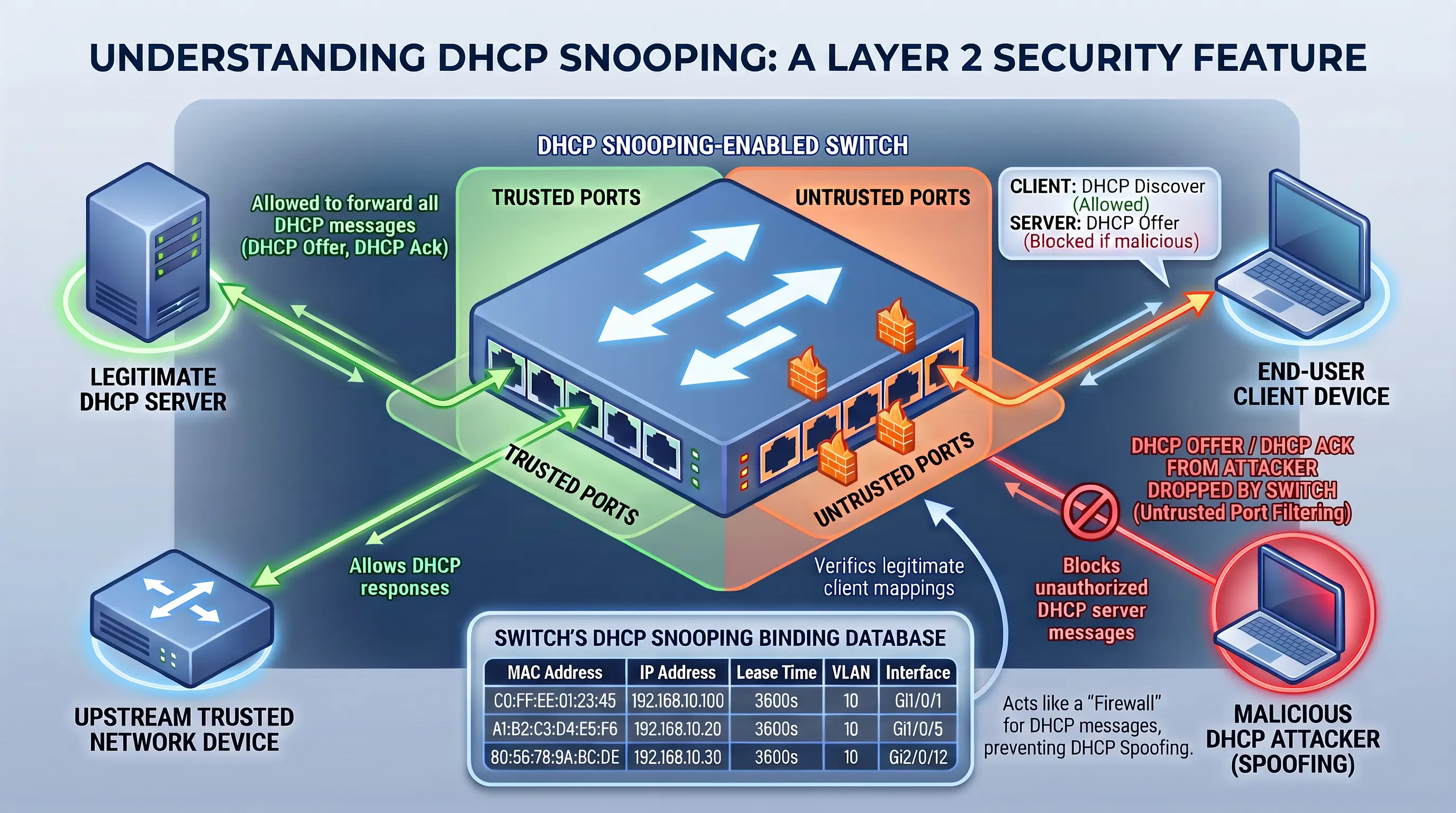
DHCP Snooping is a Layer 2 security feature that acts like a “firewall” for DHCP messages, helping prevent DHCP spoofing. DHCP Snooping classifies switch ports as either trusted or untrusted.

  • Trusted ports are typically connected to legitimate DHCP servers or other trusted network devices. They’re allowed to forward all DHCP messages.
  • Untrusted ports are usually connected to end-user devices. These ports are subject to strict filtering rules.

Image

Image Text - Diagram displaying DHCP Snooping concepts

The core logic of DHCP Snooping is to examine DHCP messages and enforce rules based on the standard DHCP message flow (DISCOVER, OFFER, REQUEST, ACK - DORA):

  1. Server message filtering: On untrusted ports, DHCP Snooping discards any incoming DHCP server messages (like OFFERs or ACKs). This prevents rogue DHCP servers from operating on client-facing ports.
  2. Client message validation: For client-originated messages (DISCOVER, REQUEST, RELEASE, DECLINE):
    • DISCOVER and REQUEST: These messages are checked for MAC address consistency. The source MAC address in the Ethernet frame must match the client hardware address (chaddr) within the DHCP message. This helps prevent a client from spoofing other devices’ MAC addresses to request multiple IP addresses.
    • RELEASE and DECLINE: These messages are validated against the DHCP Snooping binding table. This table is dynamically built by DHCP Snooping and records legitimate IP-MAC-port-VLAN bindings learned from successful DHCP transactions. A RELEASE or DECLINE message is only permitted if the incoming port and associated IP address match an entry in this binding table. This prevents an attacker from prematurely releasing another client’s IP address.

DHCP snooping configuration and verification:

To configure DHCP Snooping:

  1. Globally enable it (in Global Configuration mode)

    configure terminal
    ip dhcp snooping

    This step is crucial. If you forget to enable DHCP Snooping Globally, DHCP Snooping will not work, even if the related configurations are present. You must activate DHCP Snooping on the Switch using the ip dhcp snooping command in Global Configuration mode.

  2. Specify VLANs to snoop:

    ip dhcp snooping vlan [vlans]

  3. Configure trusted interfaces (for example, a port connected to a legitimate DHCP Server, a trunk port that leads to another switch that’s connected to a legitimate DHCP server, or a port connected to a router interface configured as a DHCP Relay Agent):

    interface [slot/number]
    ip dhcp snooping trust

A common configuration step for Layer 2 switches not acting as DHCP relay agents is to disable Option 82 insertion:

no ip dhcp snooping information option

This prevents the switch from modifying DHCP messages in a way that might cause legitimate DHCP servers to drop them.

:::

Optional features include rate limiting:

ip dhcp snooping limit rate [

of packets]

to help prevent DoS attacks against the switch’s CPU by limiting the number of DHCP messages per second on a port. If a port exceeds its limit, it can be put into an err-disabled state, with errdisable recovery cause dhcp-rate-limit allowing for automatic recovery.

Verify DHCP Snooping status with:

show ip dhcp snooping

And inspect the binding table with:

show ip dhcp snooping binding

Dynamic ARP Inspection (DAI): Combating ARP spoofing

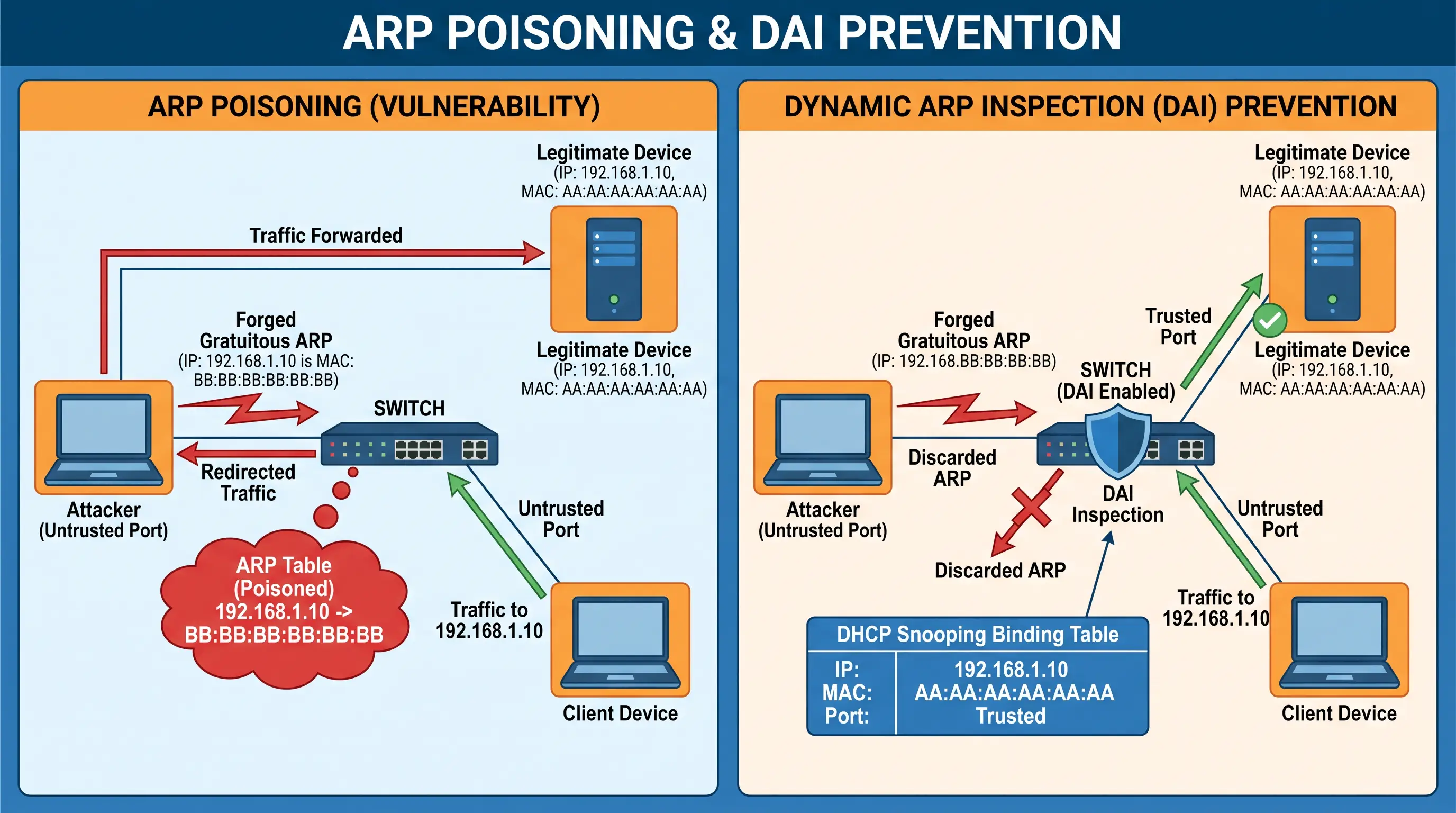
Address Resolution Protocol (ARP) is stateless and inherently insecure, which makes it vulnerable to spoofing attacks. An attacker can send forged ARP messages (for example, a gratuitous ARP) to associate the attacker’s MAC address with another device’s IP address. This can create a man-in-the-middle situation where traffic intended for the legitimate device is redirected through the attacker.

Dynamic ARP Inspection (DAI) is a Layer 2 security feature that helps prevent these ARP-based attacks.

How DAI works:

DAI inspects ARP packets on untrusted ports and validates them against trusted sources of IP-to-MAC bindings. Its primary source of truth is the DHCP Snooping binding table.

  • If DHCP Snooping is enabled, DAI can use the legitimate IP-MAC-port associations learned during DHCP transactions.
  • For devices with static IP addresses, you can configure ARP Access Control Lists (ACLs) as an alternative or supplementary source of trusted bindings.

Similar to DHCP Snooping, DAI uses trusted and untrusted ports:

  • Trusted ports are typically connected to other switches or routers where ARP messages are expected to be legitimate.
  • Untrusted ports are connected to end-user devices. All ARP messages arriving on untrusted ports are inspected.

When an ARP message arrives on an untrusted port, DAI looks up the sender IP address and sender MAC address in the DHCP Snooping binding table (or ARP ACLs). If the ARP message doesn’t match a valid entry, the switch discards it, preventing ARP spoofing.

DAI configuration and verification:

To configure DAI:

DHCP Snooping must be enabled and configured first!

  • Enable it for specific VLANs:

    ip arp inspection vlan [vlans]

  • Configure trusted interfaces:

    interface [slot/number]
    ip arp inspection trust

DAI relies heavily on DHCP Snooping, so configure DHCP Snooping first if you need dynamic IP-MAC bindings.

Optional DAI features include:

  • Rate limiting

    ip arp inspection limit rate [number of packets]

    to protect the switch’s CPU from ARP DoS attacks.

You can verify DAI status and statistics with:

show ip arp inspection
show ip arp inspection statistics

You can also check interface-specific DAI settings with:

show ip arp inspection interfaces

DHCP spoofing attacks

  • Rogue DHCP server sends fake DHCP_OFFERs to clients
  • Attacker can redirect traffic by assigning malicious gateway/DNS
  • DHCP starvation: attacker floods server with bogus DHCP_REQUESTs to exhaust IP pool

DHCP snooping

  • Layer 2 security feature; acts as DHCP firewall
  • Switch ports classified as:
    • Trusted: allow all DHCP messages (connect to real servers)
    • Untrusted: filter/block server messages (client-facing)
  • Core protections:
    • Blocks DHCP server messages (OFFER, ACK) on untrusted ports
    • Validates client messages for MAC address consistency
    • RELEASE/DECLINE allowed only if port/IP match DHCP Snooping binding table

DHCP snooping configuration

  • Enable globally: ip dhcp snooping
  • Specify VLANs: ip dhcp snooping vlan [vlans]
  • Set trusted interfaces: ip dhcp snooping trust
  • Disable Option 82 insertion if needed: no ip dhcp snooping information option
  • Optional: rate limit DHCP packets per port (ip dhcp snooping limit rate [#])
  • Verification:
    • Status: show ip dhcp snooping
    • Binding table: show ip dhcp snooping binding

Dynamic ARP inspection (DAI)

  • Prevents ARP spoofing/man-in-the-middle attacks
  • Inspects ARP packets on untrusted ports
  • Validates ARP messages against:
    • DHCP Snooping binding table (dynamic IP-MAC-port)
    • ARP ACLs (for static IPs)
  • Trusted ports: allow ARP messages without inspection
  • Untrusted ports: all ARP messages inspected and validated

DAI configuration and verification

  • DHCP Snooping must be enabled first
  • Enable DAI on VLANs: ip arp inspection vlan [vlans]
  • Set trusted interfaces: ip arp inspection trust
  • Optional: ARP rate limiting per port (ip arp inspection limit rate [#])
  • Verification:
    • Status: show ip arp inspection
    • Statistics: show ip arp inspection statistics
    • Interface settings: show ip arp inspection interfaces

Sign up for free to take 5 quiz questions on this topic

Previous
Next  | 9.1 Software Defined Networking (SDN)
All rights reserved ©2016 - 2026 Achievable, Inc.

DHCP Snooping and Dynamic ARP Inspection (DAI)

As we discussed in Chapter 4.3 Dynamic Host Configuration Protocol (DHCP), DHCP dynamically assigns IP addresses to PCs. PCs use DHCP to obtain an IP address so they can participate in a TCP/IP-based network (for example, the Internet).

However, as we discussed in Chapter 8.1 Fundamental network security concepts, DHCP spoofing is a form of “man-in-the-middle” attack.

In a typical DHCP spoofing scenario:

  • A rogue DHCP server is physically connected to your LAN.
  • It impersonates a legitimate DHCP server by sending unsolicited DHCP_OFFER messages.
  • Clients may accept the attacker’s DHCP information as legitimate.
  • The attacker can provide settings (like the default gateway or DNS server) that force traffic to flow through the attacker.

A related DHCP-based attack uses malicious DHCP_REQUEST packets with many randomized, spoofed MAC addresses to exhaust the legitimate DHCP server’s address pool. When the pool is exhausted, real clients can’t obtain IP addresses.

Image

Image Title - Example of DHCP Spoofing

The cure for DHCP spoofing: DHCP snooping

DHCP Snooping is a Layer 2 security feature that acts like a “firewall” for DHCP messages, helping prevent DHCP spoofing. DHCP Snooping classifies switch ports as either trusted or untrusted.

  • Trusted ports are typically connected to legitimate DHCP servers or other trusted network devices. They’re allowed to forward all DHCP messages.
  • Untrusted ports are usually connected to end-user devices. These ports are subject to strict filtering rules.

Image

Image Text - Diagram displaying DHCP Snooping concepts

The core logic of DHCP Snooping is to examine DHCP messages and enforce rules based on the standard DHCP message flow (DISCOVER, OFFER, REQUEST, ACK - DORA):

  1. Server message filtering: On untrusted ports, DHCP Snooping discards any incoming DHCP server messages (like OFFERs or ACKs). This prevents rogue DHCP servers from operating on client-facing ports.
  2. Client message validation: For client-originated messages (DISCOVER, REQUEST, RELEASE, DECLINE):
    • DISCOVER and REQUEST: These messages are checked for MAC address consistency. The source MAC address in the Ethernet frame must match the client hardware address (chaddr) within the DHCP message. This helps prevent a client from spoofing other devices’ MAC addresses to request multiple IP addresses.
    • RELEASE and DECLINE: These messages are validated against the DHCP Snooping binding table. This table is dynamically built by DHCP Snooping and records legitimate IP-MAC-port-VLAN bindings learned from successful DHCP transactions. A RELEASE or DECLINE message is only permitted if the incoming port and associated IP address match an entry in this binding table. This prevents an attacker from prematurely releasing another client’s IP address.

DHCP snooping configuration and verification:

To configure DHCP Snooping:

  1. Globally enable it (in Global Configuration mode)

    configure terminal
    ip dhcp snooping

    This step is crucial. If you forget to enable DHCP Snooping Globally, DHCP Snooping will not work, even if the related configurations are present. You must activate DHCP Snooping on the Switch using the ip dhcp snooping command in Global Configuration mode.

  2. Specify VLANs to snoop:

    ip dhcp snooping vlan [vlans]

  3. Configure trusted interfaces (for example, a port connected to a legitimate DHCP Server, a trunk port that leads to another switch that’s connected to a legitimate DHCP server, or a port connected to a router interface configured as a DHCP Relay Agent):

    interface [slot/number]
    ip dhcp snooping trust

A common configuration step for Layer 2 switches not acting as DHCP relay agents is to disable Option 82 insertion:

no ip dhcp snooping information option

This prevents the switch from modifying DHCP messages in a way that might cause legitimate DHCP servers to drop them.

:::

Optional features include rate limiting:

ip dhcp snooping limit rate [

of packets]

to help prevent DoS attacks against the switch’s CPU by limiting the number of DHCP messages per second on a port. If a port exceeds its limit, it can be put into an err-disabled state, with errdisable recovery cause dhcp-rate-limit allowing for automatic recovery.

Verify DHCP Snooping status with:

show ip dhcp snooping

And inspect the binding table with:

show ip dhcp snooping binding

Dynamic ARP Inspection (DAI): Combating ARP spoofing

Address Resolution Protocol (ARP) is stateless and inherently insecure, which makes it vulnerable to spoofing attacks. An attacker can send forged ARP messages (for example, a gratuitous ARP) to associate the attacker’s MAC address with another device’s IP address. This can create a man-in-the-middle situation where traffic intended for the legitimate device is redirected through the attacker.

Dynamic ARP Inspection (DAI) is a Layer 2 security feature that helps prevent these ARP-based attacks.

How DAI works:

DAI inspects ARP packets on untrusted ports and validates them against trusted sources of IP-to-MAC bindings. Its primary source of truth is the DHCP Snooping binding table.

  • If DHCP Snooping is enabled, DAI can use the legitimate IP-MAC-port associations learned during DHCP transactions.
  • For devices with static IP addresses, you can configure ARP Access Control Lists (ACLs) as an alternative or supplementary source of trusted bindings.

Similar to DHCP Snooping, DAI uses trusted and untrusted ports:

  • Trusted ports are typically connected to other switches or routers where ARP messages are expected to be legitimate.
  • Untrusted ports are connected to end-user devices. All ARP messages arriving on untrusted ports are inspected.

When an ARP message arrives on an untrusted port, DAI looks up the sender IP address and sender MAC address in the DHCP Snooping binding table (or ARP ACLs). If the ARP message doesn’t match a valid entry, the switch discards it, preventing ARP spoofing.

DAI configuration and verification:

To configure DAI:

DHCP Snooping must be enabled and configured first!

  • Enable it for specific VLANs:

    ip arp inspection vlan [vlans]

  • Configure trusted interfaces:

    interface [slot/number]
    ip arp inspection trust

DAI relies heavily on DHCP Snooping, so configure DHCP Snooping first if you need dynamic IP-MAC bindings.

Optional DAI features include:

  • Rate limiting

    ip arp inspection limit rate [number of packets]

    to protect the switch’s CPU from ARP DoS attacks.

You can verify DAI status and statistics with:

show ip arp inspection
show ip arp inspection statistics

You can also check interface-specific DAI settings with:

show ip arp inspection interfaces

Key points

DHCP spoofing attacks

  • Rogue DHCP server sends fake DHCP_OFFERs to clients
  • Attacker can redirect traffic by assigning malicious gateway/DNS
  • DHCP starvation: attacker floods server with bogus DHCP_REQUESTs to exhaust IP pool

DHCP snooping

  • Layer 2 security feature; acts as DHCP firewall
  • Switch ports classified as:
    • Trusted: allow all DHCP messages (connect to real servers)
    • Untrusted: filter/block server messages (client-facing)
  • Core protections:
    • Blocks DHCP server messages (OFFER, ACK) on untrusted ports
    • Validates client messages for MAC address consistency
    • RELEASE/DECLINE allowed only if port/IP match DHCP Snooping binding table

DHCP snooping configuration

  • Enable globally: {`ip dhcp snooping`}
  • Specify VLANs: {`ip dhcp snooping vlan [vlans]`}
  • Set trusted interfaces: {`ip dhcp snooping trust`}
  • Disable Option 82 insertion if needed: {`no ip dhcp snooping information option`}
  • Optional: rate limit DHCP packets per port ({`ip dhcp snooping limit rate [#]`})
  • Verification:
    • Status: {`show ip dhcp snooping`}
    • Binding table: {`show ip dhcp snooping binding`}

Dynamic ARP inspection (DAI)

  • Prevents ARP spoofing/man-in-the-middle attacks
  • Inspects ARP packets on untrusted ports
  • Validates ARP messages against:
    • DHCP Snooping binding table (dynamic IP-MAC-port)
    • ARP ACLs (for static IPs)
  • Trusted ports: allow ARP messages without inspection
  • Untrusted ports: all ARP messages inspected and validated

DAI configuration and verification

  • DHCP Snooping must be enabled first
  • Enable DAI on VLANs: {`ip arp inspection vlan [vlans]`}
  • Set trusted interfaces: {`ip arp inspection trust`}
  • Optional: ARP rate limiting per port ({`ip arp inspection limit rate [#]`})
  • Verification:
    • Status: {`show ip arp inspection`}
    • Statistics: {`show ip arp inspection statistics`}
    • Interface settings: {`show ip arp inspection interfaces`}

More from Layer 2 security features

  • Port security