



Router redundancy in an Ethernet LAN using First Hop Redundancy Protocols (FHRPs)
The need for router redundancy
Routers let hosts on an Ethernet LAN reach other networks and the Internet. But what happens if the router fails? In many environments (businesses, schools, libraries, banks), a router outage can stop Internet-dependent work. For many organizations - especially in the financial sector - that kind of downtime isn’t acceptable.
A common first idea is to add a second router as a backup. That’s the right direction, but simply adding a backup router introduces a key problem: hosts still need a single, reliable default gateway address.
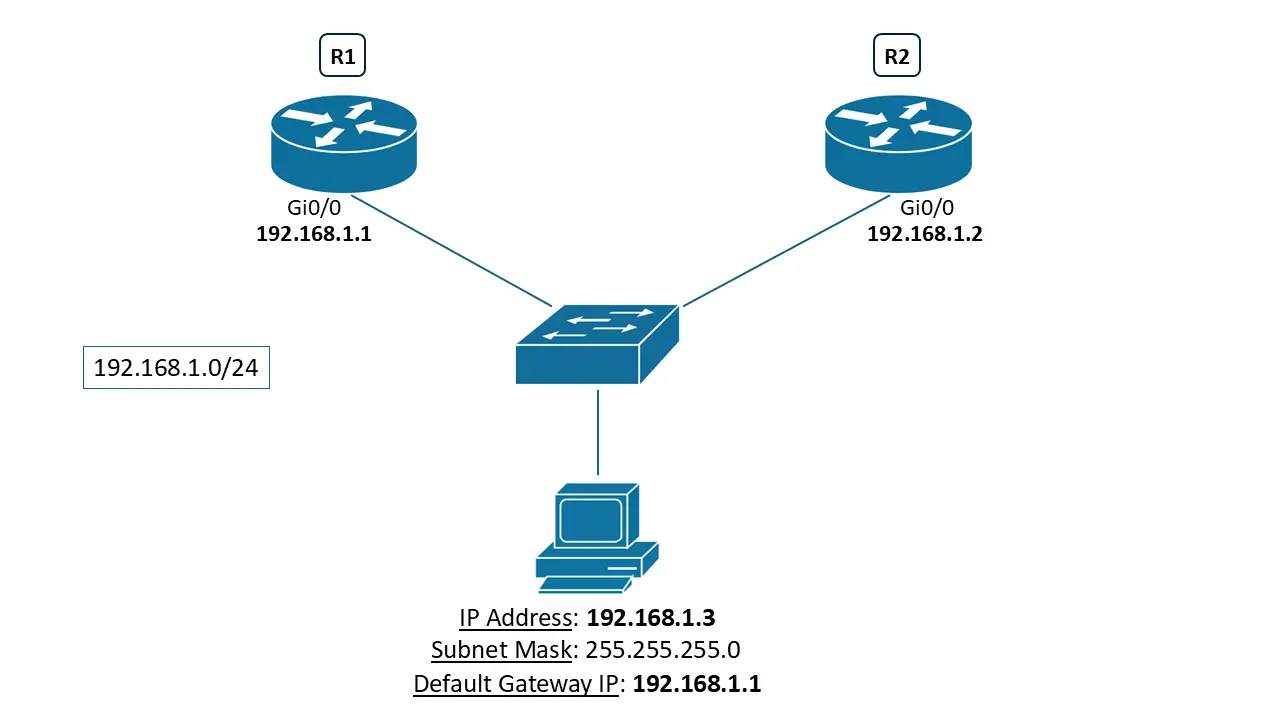
In the image above, there are two routers:
- R1 is the primary router and the default gateway for hosts in the 192.168.1.0/24 LAN.
- R2 is the backup router that should take over as the default gateway if R1 fails.
Now let’s walk through what happens when R1 fails.
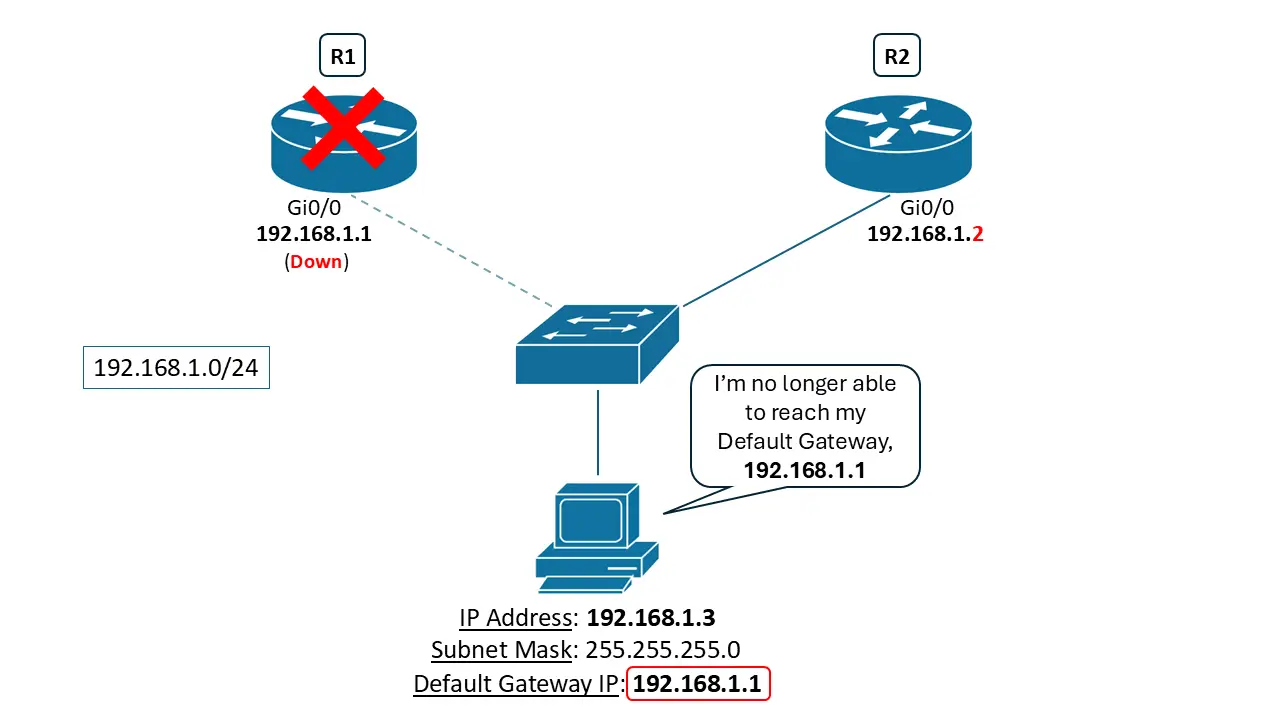
When R1 fails, hosts in the 192.168.1.0/24 network lose Internet access even though R2 is still up. The reason is simple: the hosts are configured to use R1’s GigabitEthernet0/0 IP as their default gateway (192.168.1.1).
However:
- R1 Gi0/0 = 192.168.1.1 (the configured default gateway on the hosts)
- R2 Gi0/0 = 192.168.1.2
R2 can’t just “become” 192.168.1.1 while R1 is using it, because that would create a Duplicate IP Address Conflict. You cannot have duplicate IP addresses existing within the same IP network. A helpful analogy is phone numbers: if multiple phones in the same area code had the same number, which phone should ring?
So the core issue is this: hosts are pointing to a gateway IP address that no longer exists when R1 fails, and the backup router can’t safely use that same IP address under normal conditions.
Why common workarounds aren’t acceptable
This situation creates a real conundrum. There are workarounds, but they’re not ideal:
- You could configure half the hosts to use R1 as their default gateway and the other half to use R2. But if either router fails, half the network loses Internet access.
- You could manually change every host’s default gateway to R2’s IP address after a failure. On a large network with hundreds of hosts, this is impractical, causes prolonged downtime, and requires significant effort to coordinate.
Those two options listed above are not acceptable in a modern network, especially where mission critical data must be routed to other networks or out to the Internet.
The best-practice solution: FHRPs
The best-practice solution is to implement a First Hop Redundancy Protocol (FHRP) between R1 and R2.
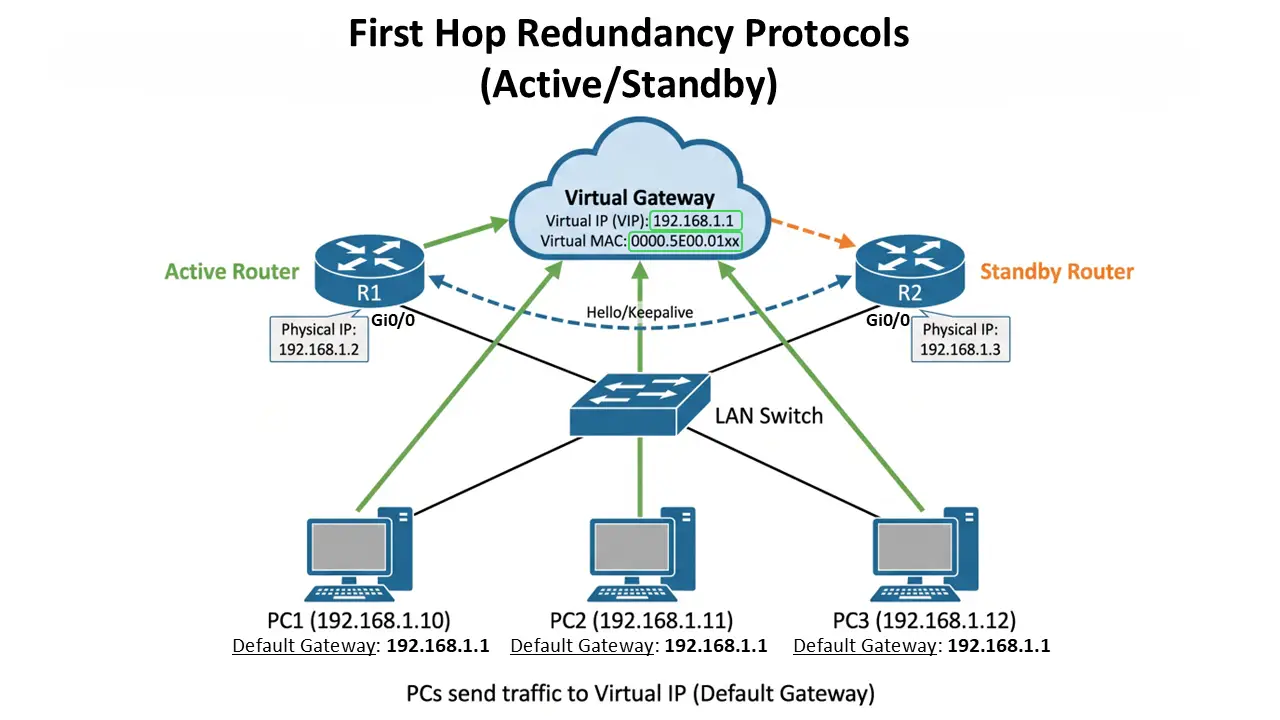
An FHRP solves the default gateway problem by letting the routers share:
- a virtual IP address (used by hosts as the default gateway)
- a virtual MAC address (so hosts don’t need to update ARP entries during failover)
With an FHRP in place:
- The routers operate in Active/Standby mode for the virtual IP.
- The active router forwards traffic and handles gateway duties.
- The standby router monitors the active router and takes over if it detects a failure.
- Each router’s physical interface still has its own unique IP address in the LAN (separate from the virtual IP).
Because the virtual MAC address stays consistent, hosts typically don’t need to relearn ARP information when the standby router takes over. That’s what makes the failover process seamless.
There are two common protocols used today that perform this function.
The Hot Standby Router Protocol (HSRP)
The Hot Standby Router Protocol (HSRP) is Cisco’s proprietary FHRP. It allows one router to be active (forwarding IP traffic and responding to ARP requests from hosts) while another router stays in standby, ready to take over if the active router goes down.
To coordinate failover, the two routers send Hello messages to each other over the directly connected LAN link. These messages act as keepalives and help each router detect whether the other has failed.
The virtual IP address configured on both the active and standby routers is the address the hosts use as their default gateway.
-
HSRP uses multicast address 224.0.0.102 as the destination address in its hello messages.
-
The format of the HSRP virtual MAC address is 0000.0C07.ACxx, where xx is the hexadecimal value of the HSRP group number. For example, group 1 uses 0000. 0C07. AC01.
Virtual Router Redundancy Protocol (VRRP)
The Virtual Router Redundancy Protocol (VRRP) is an industry standard FHRP. It provides the same basic functionality as HSRP. The main terminology difference is that VRRP uses:
- Master/Backup instead of Active/Standby
These terms describe the same roles: one router forwards traffic as the gateway, and the other is ready to take over if the first fails.
VRRP uses the destination multicast address 224.0.0.18 to send its hello packets.
The VRRP virtual MAC address follows the IEEE 802 format: 0000.5E00.01xx, where xx is the VRRP group ID in hexadecimal. For example, group 121 uses 0000.5E00.0179.