
Achievable logoAchievable logo
Praxis Core: Math (5733)
Sign in
Sign up
Purchase
Textbook
Practice exams
Support
How it works
Exam catalog
Mountain with a flag at the peak
Textbook
Introduction
1. Number and quantity
2. Data analysis, statistics, and probability
2.1 Understanding central tendencies
2.2 Understanding and representing data
2.3 Interpreting data
2.4 Interpreting scatterplots
2.5 Computing probabilities
3. Algebra and geometry
Wrapping up
Achievable logoAchievable logo
2.2 Understanding and representing data
Achievable Praxis Core: Math (5733)
2. Data analysis, statistics, and probability
Our Praxis Core: Math course is currently in development and is a work-in-progress.

Understanding and representing data

13 min read
Font
Discuss
Share
Feedback

Data can be organized and displayed in many formats. Choosing the right representation makes patterns easier to spot and conclusions easier to support. Being able to read, create, and interpret these displays is a key skill for solving real-world problems.

Types of data

There are two major types of data:

  • Categorical (Qualitative): describes qualities or characteristics (e.g., favorite color, type of pet)
  • Numerical (Quantitative): measures or counts something (e.g., height, number of siblings)

Numerical data can be:

  • Discrete: specific values, often whole-number counts (e.g., number of pets)
  • Continuous: any value within a range (e.g., weight, temperature)

Knowing the type of data helps you choose a display that matches what the data can (and can’t) show.

Common types of data displays

Display type Description Best used for
Table Organizes values in rows and columns All types of raw data
Bar graph Uses bars to compare frequencies or categories Categorical data
Line graph Shows trends over time using points connected by lines Time-based changes in data
Circle graph Also called a pie chart, shows parts of a whole Percentages or proportions
Histogram A bar graph where each bar represents a range (or bin) of values Distribution of numerical data
Stem-and-leaf Displays quantitative data in a way that preserves actual data points Small data sets of numbers
Boxplot Summarizes a dataset using quartiles, median, and outliers Comparing multiple sets, identifying spread
Scatterplot Plots two numerical variables to show correlation or relationships Bivariate numerical data
Timeline Places events in order across time Historical or sequential data
Pictograph Uses pictures or icons to show frequency Simple visual comparison

Choosing the right display

Different situations call for different graphs. The best display depends on the type of data and what you want the reader to notice. The examples below show how matching the display to the data makes patterns easier to interpret.

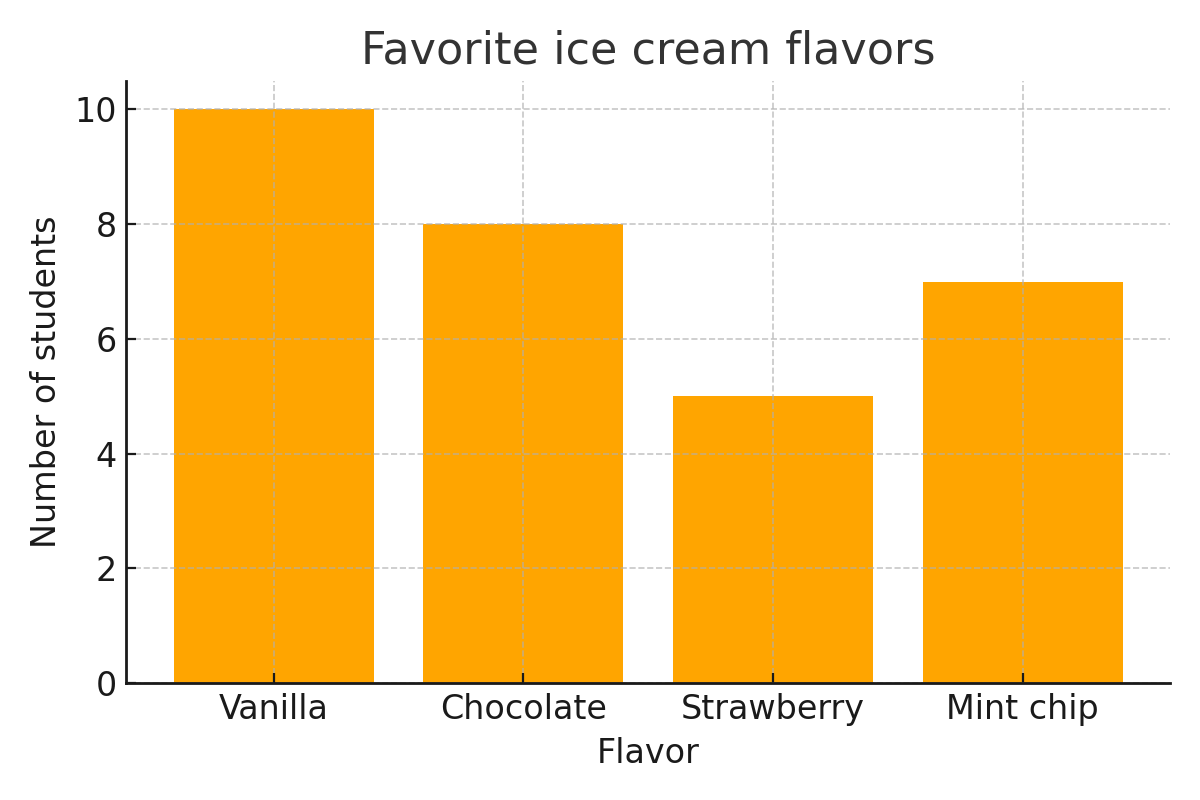
Example: Categorical data A teacher surveys students on their favorite ice cream flavor. The results are:

Flavor Students
Vanilla 10
Chocolate 8
Strawberry 5
Mint Chip 7

Answer: A bar graph.

A bar graph fits because the data are categories (flavors). Each bar represents one flavor, and the bar height shows how many students chose it. That makes comparisons across categories quick and clear.

Ice cream tracker
Ice cream tracker

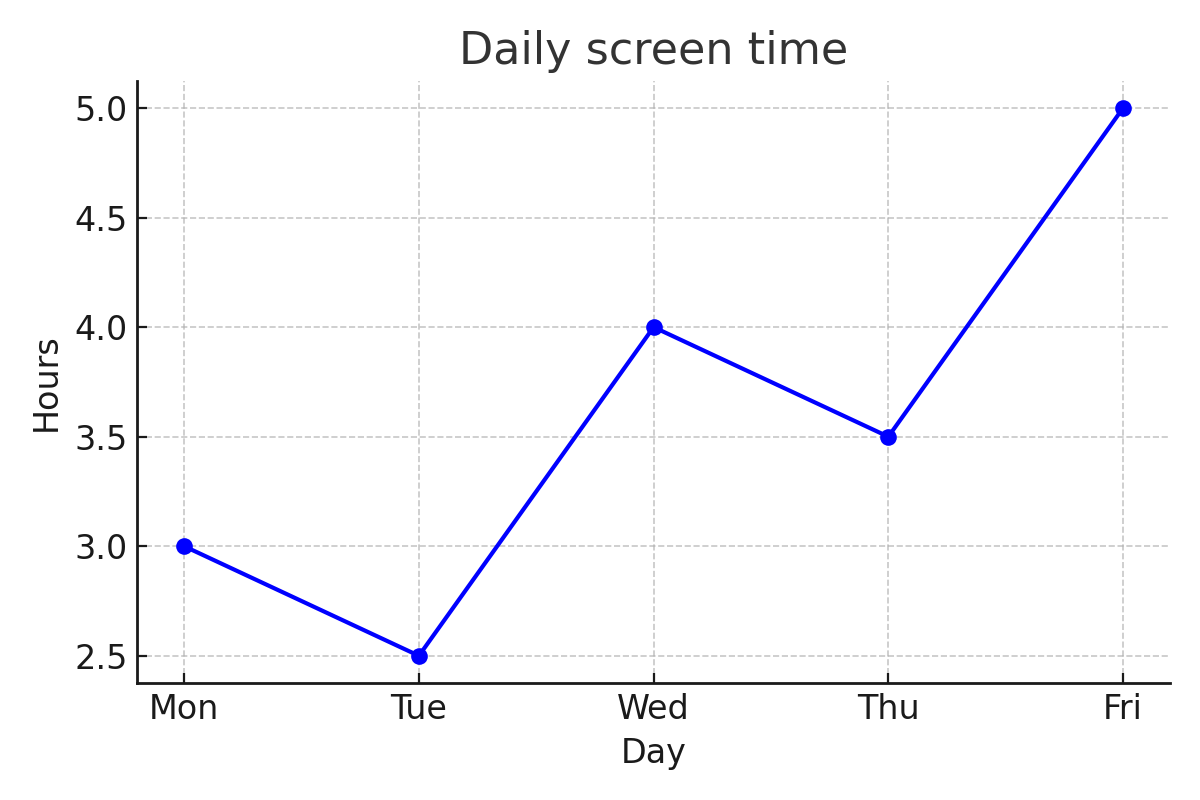
Example: Numerical data over time A student tracks their daily screen time for a week:

Day Hours
Monday 3
Tuesday 2.5
Wednesday 4
Thursday 3.5
Friday 5

Answer: A line graph.

A line graph works well because the data are numerical and ordered by time. Plotting the points and connecting them highlights day-to-day changes and makes overall trends easy to see.

Daily screen time
Daily screen time

Example: Visual representation of proportions In a class of 20 students:

  • 5 walk to school
  • 10 ride the bus
  • 5 are dropped off by car

Answer: A circle graph (pie chart).

A circle graph is a good choice because the categories make up a whole group (the class). Each slice shows what fraction or percentage of the class uses each transportation method.

How students get to school

Interpreting visual data

Sidenote
Caution on misleading graphs

Graphs can make data easier to understand, but they can also be misleading.

  • Changing the scale of an axis can exaggerate or minimize differences.
  • Using a non-zero baseline can make small changes appear much larger than they are.

Tip: Always check the scale and labels before drawing conclusions from a graph.

When reading a graph or chart, pay close attention to:

Titles and labels

  • Explain what the graph represents and what each axis or category means.

Scale

  • Check whether spacing is consistent and whether units are clearly shown.

Trends

  • Look for overall increases, decreases, or patterns over time.

Outliers

  • Identify values that don’t fit the overall pattern, since they can affect averages and interpretations.

Example: Read a bar graph A bar graph below shows the number of books read by five students. Read the graph and answer the following questions:

Who read the most number of books and how many? Who read the least number of books and how many? What is the mean number of books read according to this data?

Books read by students
(spoiler)

To answer these questions, compare the heights of the bars.

  • The tallest bar represents the student who read the most books.

  • The shortest bar represents the student who read the fewest books.

  • Ben’s bar is the tallest at 7 books, and Carla’s bar is the shortest at 3 books.

  • Next, find the mean (average) number of books read.

  • Ana: 4, Ben: 7, Carla: 3, David: 6, Emma: 5

  • Total books =4+7+3+6+5=25

    • Number of students =5
    • Mean =525​=5

Answer: Ben read the most books (7). Carla read the fewest books (3). The mean number of books read is 5.

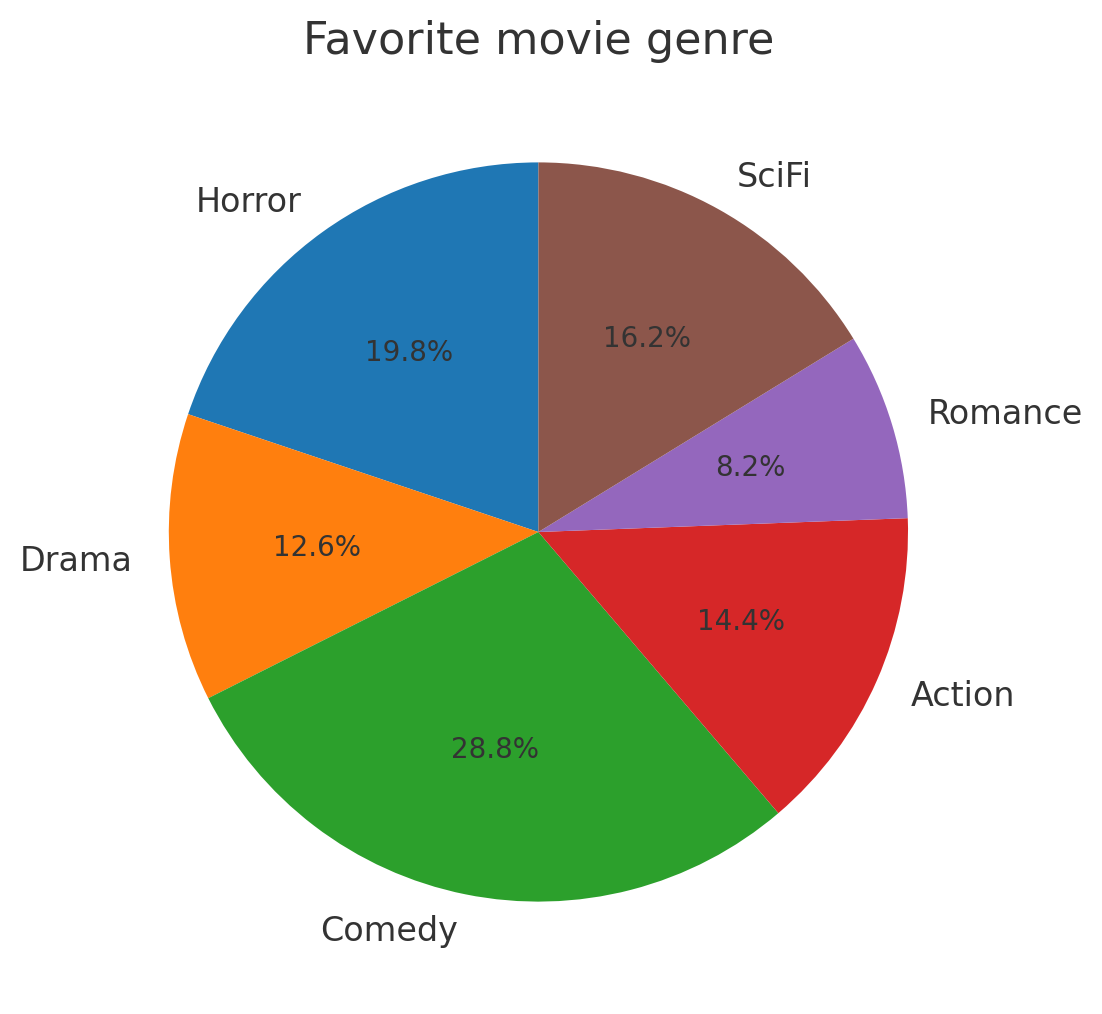
Example: Applications of graphical data 1650 people responded to the survey saying SciFi was their favorite genre. How many total people were surveyed? Use the circle graph below to find the total number of people surveyed.

Favorite movie genre
(spoiler)

The circle graph shows that SciFi accounts for 16.2% of all responses.

  • Convert the percentage to a decimal: 16.2%=0.162
  • Let x represent the total number of people surveyed.
    • Set up the equation using the fraction of the whole: 0.162x=1650
  • Divide both sides by 0.162: x≈10185.185

Since the total number of people must be a whole number:

Answer: 10,185 people were surveyed.

Translating between representations

On the Praxis exam, data is often presented in one form and then used in another. Being able to translate between representations helps you understand what the data is saying and choose the right next step.

  • Tables show exact values and make totals easy to compute.
  • Graphs highlight patterns, comparisons, and trends.
  • Verbal descriptions explain what the data means in context.

Common translations include:

  • Table → Graph (bar, line, or circle)
  • Words → Table or graph
  • Graph → Summary or verbal description

Example: Different ways of representing the same data A class has 5 students who prefer apples, 7 who prefer bananas, and 3 who prefer oranges." What is the best way to represent the data?

Fruit Students
Apples 5
Bananas 7
Oranges 3

Answer: A table clearly organizes the counts for each category. From this table, the data could easily be displayed visually using a bar graph to compare categories or a circle graph to show proportions.

Distribution of favorite fruits
Favorite fruits of the class

Example: Interpreting a graph to draw conclusions A line graph shows monthly sales at a lemonade stand:

  • January: $40
  • February: $60
  • March: $100
Monthly sales at a lemonade stand

To translate a graph into words, focus on the overall pattern rather than listing every point. Here, sales increase each month, which suggests steady growth over time.

Answer: Sales increased steadily each month. The stand is becoming more popular or effective in marketing.

Interpreting stem-and-leaf plots

A stem-and-leaf plot shows the distribution of a small numerical dataset while keeping the exact data values. The stem contains the leading digit(s), and the leaf contains the final digit of each number.

Example: Two-digit numbers The scores on a math quiz were: 65, 68, 71, 74, 77, 82, 82, 89

To construct a stem-and-leaf plot, split each number into two parts:

  • The stem is the tens digit.
  • The leaf is the ones digit.

Group the numbers by their stems and write the leaves in ascending order for each stem.

Stem Leaf
6 5  8
7 1  4  7
8 2  2  9

Answer:

  • Stem 6 with leaves 5 and 8 represents the values 65 and 68.
  • Stem 7 with leaves 1, 4, and 7 represents 71, 74, and 77.
  • Stem 8 with leaves 2, 2, and 9 represents 82, 82, and 89.

The data are already sorted within each stem, so you can quickly see clusters, gaps, and the overall spread from 65 to 89.

Example: Two-digit numbers The ages of eight people were: 22, 25, 25, 28, 31, 33, 34, 37

(spoiler)

First, separate each number into a stem (tens digit) and a leaf (ones digit). Then group values that share the same stem and list the leaves in ascending order.

Stem Leaf
2 2  5  5  8
3 1  3  4  7

Answer:

  • Stem 2 with leaves 2, 5, 5, and 8 represents the ages 22, 25, 25, and 28.
  • Stem 3 with leaves 1, 3, 4, and 7 represents the ages 31, 33, 34, and 37.

Because the leaves are written in ascending order, the dataset is automatically sorted. This makes it easier to identify minimum and maximum values, spot clusters, and compare how the data are distributed across ranges.

Interpreting scatterplots

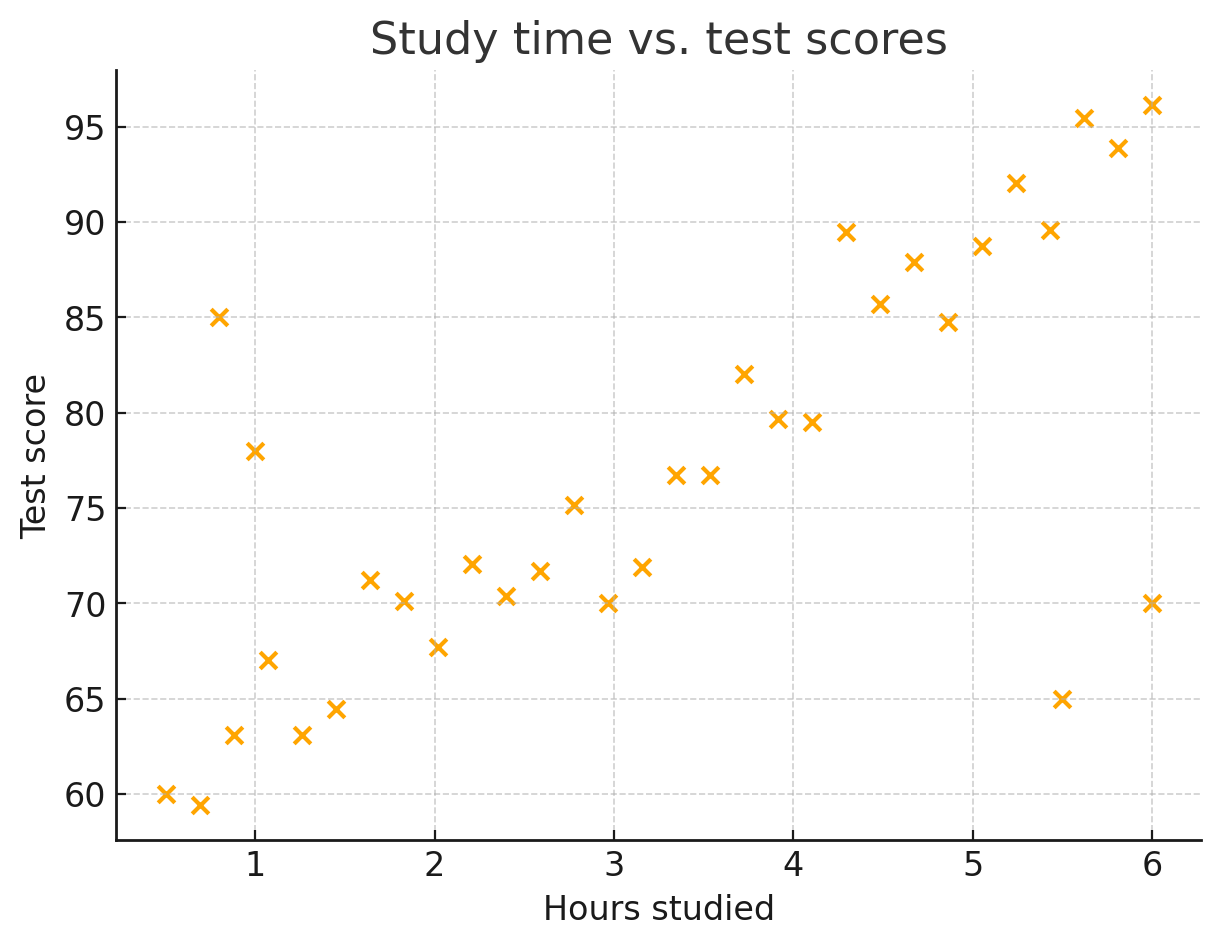
Scatterplots show the relationship between two numerical variables by plotting individual data points on a coordinate grid. The x-coordinate represents one variable and the y-coordinate represents the other. Each point corresponds to one observation.

By looking at the overall pattern of points, you can describe trends and possible correlations. For example, a scatterplot of study time versus test score may show a positive trend, while a scatterplot of absences versus GPA may show a negative trend.

When interpreting a scatterplot, look for:

  • Direction: Does the pattern increase (positive) or decrease (negative)?
  • Form: Is the relationship roughly linear or curved?
  • Strength: Are the points tightly clustered or widely scattered?
  • Outliers: Are there points far from the overall pattern?

Correlation describes how closely two variables are related. Strong correlation occurs when points lie close to a straight line, while weak correlation occurs when points are widely dispersed. The correlation coefficient r measures this strength: values close to 1 or −1 indicate strong relationships, while values near 0 indicate little to no linear relationship.

A scatterplot can suggest a relationship, but correlation does not imply causation.

Example: Study time vs. test scores

Study time vs. test scores

Example: Interpreting graphical data How many students who studied for more than 4 hours received an A (scored above 90%)?

(spoiler)

To answer this question, apply both conditions at the same time:

  • Study time greater than 4 hours (points to the right of 4 on the horizontal axis)
  • Test scores above 90% (points above 90 on the vertical axis) Count only the points that satisfy both conditions.

From the scatterplot, there are 4 points that lie to the right of 4 hours and above the 90% score line.

Answer: 4 students studied more than 4 hours and scored above 90%.

Sidenote
Different types of correlation

The points on the graph generally trend upward, meaning there’s a positive correlation. As study time increases, test scores tend to increase too.

No correlation would look like a cloud of random dots. Negative correlation would mean the points slope downward.

  • Always read titles and labels carefully.
  • Make sure you understand the scale before making conclusions.
  • Look for patterns and outliers.
  • Choose your graph based on the type of data.
  • Be comfortable moving between words, numbers, tables, and graphs.
  • Use stem-and-leaf plots when keeping individual values is important.
  • Use scatterplots when comparing two numerical variables.

Sign up for free to take 5 quiz questions on this topic

All rights reserved ©2016 - 2026 Achievable, Inc.

Understanding and representing data

Data can be organized and displayed in many formats. Choosing the right representation makes patterns easier to spot and conclusions easier to support. Being able to read, create, and interpret these displays is a key skill for solving real-world problems.

Types of data

There are two major types of data:

  • Categorical (Qualitative): describes qualities or characteristics (e.g., favorite color, type of pet)
  • Numerical (Quantitative): measures or counts something (e.g., height, number of siblings)

Numerical data can be:

  • Discrete: specific values, often whole-number counts (e.g., number of pets)
  • Continuous: any value within a range (e.g., weight, temperature)

Knowing the type of data helps you choose a display that matches what the data can (and can’t) show.

Common types of data displays

Display type Description Best used for
Table Organizes values in rows and columns All types of raw data
Bar graph Uses bars to compare frequencies or categories Categorical data
Line graph Shows trends over time using points connected by lines Time-based changes in data
Circle graph Also called a pie chart, shows parts of a whole Percentages or proportions
Histogram A bar graph where each bar represents a range (or bin) of values Distribution of numerical data
Stem-and-leaf Displays quantitative data in a way that preserves actual data points Small data sets of numbers
Boxplot Summarizes a dataset using quartiles, median, and outliers Comparing multiple sets, identifying spread
Scatterplot Plots two numerical variables to show correlation or relationships Bivariate numerical data
Timeline Places events in order across time Historical or sequential data
Pictograph Uses pictures or icons to show frequency Simple visual comparison

Choosing the right display

Different situations call for different graphs. The best display depends on the type of data and what you want the reader to notice. The examples below show how matching the display to the data makes patterns easier to interpret.

Example: Categorical data A teacher surveys students on their favorite ice cream flavor. The results are:

Flavor Students
Vanilla 10
Chocolate 8
Strawberry 5
Mint Chip 7

Answer: A bar graph.

A bar graph fits because the data are categories (flavors). Each bar represents one flavor, and the bar height shows how many students chose it. That makes comparisons across categories quick and clear.

Example: Numerical data over time A student tracks their daily screen time for a week:

Day Hours
Monday 3
Tuesday 2.5
Wednesday 4
Thursday 3.5
Friday 5

Answer: A line graph.

A line graph works well because the data are numerical and ordered by time. Plotting the points and connecting them highlights day-to-day changes and makes overall trends easy to see.

Example: Visual representation of proportions In a class of 20 students:

  • 5 walk to school
  • 10 ride the bus
  • 5 are dropped off by car

Answer: A circle graph (pie chart).

A circle graph is a good choice because the categories make up a whole group (the class). Each slice shows what fraction or percentage of the class uses each transportation method.

Interpreting visual data

Sidenote
Caution on misleading graphs

Graphs can make data easier to understand, but they can also be misleading.

  • Changing the scale of an axis can exaggerate or minimize differences.
  • Using a non-zero baseline can make small changes appear much larger than they are.

Tip: Always check the scale and labels before drawing conclusions from a graph.

When reading a graph or chart, pay close attention to:

Titles and labels

  • Explain what the graph represents and what each axis or category means.

Scale

  • Check whether spacing is consistent and whether units are clearly shown.

Trends

  • Look for overall increases, decreases, or patterns over time.

Outliers

  • Identify values that don’t fit the overall pattern, since they can affect averages and interpretations.

Example: Read a bar graph A bar graph below shows the number of books read by five students. Read the graph and answer the following questions:

Who read the most number of books and how many? Who read the least number of books and how many? What is the mean number of books read according to this data?

(spoiler)

To answer these questions, compare the heights of the bars.

  • The tallest bar represents the student who read the most books.

  • The shortest bar represents the student who read the fewest books.

  • Ben’s bar is the tallest at 7 books, and Carla’s bar is the shortest at 3 books.

  • Next, find the mean (average) number of books read.

  • Ana: 4, Ben: 7, Carla: 3, David: 6, Emma: 5

  • Total books =4+7+3+6+5=25

    • Number of students =5
    • Mean =525​=5

Answer: Ben read the most books (7). Carla read the fewest books (3). The mean number of books read is 5.

Example: Applications of graphical data 1650 people responded to the survey saying SciFi was their favorite genre. How many total people were surveyed? Use the circle graph below to find the total number of people surveyed.

(spoiler)

The circle graph shows that SciFi accounts for 16.2% of all responses.

  • Convert the percentage to a decimal: 16.2%=0.162
  • Let x represent the total number of people surveyed.
    • Set up the equation using the fraction of the whole: 0.162x=1650
  • Divide both sides by 0.162: x≈10185.185

Since the total number of people must be a whole number:

Answer: 10,185 people were surveyed.

Translating between representations

On the Praxis exam, data is often presented in one form and then used in another. Being able to translate between representations helps you understand what the data is saying and choose the right next step.

  • Tables show exact values and make totals easy to compute.
  • Graphs highlight patterns, comparisons, and trends.
  • Verbal descriptions explain what the data means in context.

Common translations include:

  • Table → Graph (bar, line, or circle)
  • Words → Table or graph
  • Graph → Summary or verbal description

Example: Different ways of representing the same data A class has 5 students who prefer apples, 7 who prefer bananas, and 3 who prefer oranges." What is the best way to represent the data?

Fruit Students
Apples 5
Bananas 7
Oranges 3

Answer: A table clearly organizes the counts for each category. From this table, the data could easily be displayed visually using a bar graph to compare categories or a circle graph to show proportions.

Example: Interpreting a graph to draw conclusions A line graph shows monthly sales at a lemonade stand:

  • January: $40
  • February: $60
  • March: $100

To translate a graph into words, focus on the overall pattern rather than listing every point. Here, sales increase each month, which suggests steady growth over time.

Answer: Sales increased steadily each month. The stand is becoming more popular or effective in marketing.

Interpreting stem-and-leaf plots

A stem-and-leaf plot shows the distribution of a small numerical dataset while keeping the exact data values. The stem contains the leading digit(s), and the leaf contains the final digit of each number.

Example: Two-digit numbers The scores on a math quiz were: 65, 68, 71, 74, 77, 82, 82, 89

To construct a stem-and-leaf plot, split each number into two parts:

  • The stem is the tens digit.
  • The leaf is the ones digit.

Group the numbers by their stems and write the leaves in ascending order for each stem.

Stem Leaf
6 5  8
7 1  4  7
8 2  2  9

Answer:

  • Stem 6 with leaves 5 and 8 represents the values 65 and 68.
  • Stem 7 with leaves 1, 4, and 7 represents 71, 74, and 77.
  • Stem 8 with leaves 2, 2, and 9 represents 82, 82, and 89.

The data are already sorted within each stem, so you can quickly see clusters, gaps, and the overall spread from 65 to 89.

Example: Two-digit numbers The ages of eight people were: 22, 25, 25, 28, 31, 33, 34, 37

(spoiler)

First, separate each number into a stem (tens digit) and a leaf (ones digit). Then group values that share the same stem and list the leaves in ascending order.

Stem Leaf
2 2  5  5  8
3 1  3  4  7

Answer:

  • Stem 2 with leaves 2, 5, 5, and 8 represents the ages 22, 25, 25, and 28.
  • Stem 3 with leaves 1, 3, 4, and 7 represents the ages 31, 33, 34, and 37.

Because the leaves are written in ascending order, the dataset is automatically sorted. This makes it easier to identify minimum and maximum values, spot clusters, and compare how the data are distributed across ranges.

Interpreting scatterplots

Scatterplots show the relationship between two numerical variables by plotting individual data points on a coordinate grid. The x-coordinate represents one variable and the y-coordinate represents the other. Each point corresponds to one observation.

By looking at the overall pattern of points, you can describe trends and possible correlations. For example, a scatterplot of study time versus test score may show a positive trend, while a scatterplot of absences versus GPA may show a negative trend.

When interpreting a scatterplot, look for:

  • Direction: Does the pattern increase (positive) or decrease (negative)?
  • Form: Is the relationship roughly linear or curved?
  • Strength: Are the points tightly clustered or widely scattered?
  • Outliers: Are there points far from the overall pattern?

Correlation describes how closely two variables are related. Strong correlation occurs when points lie close to a straight line, while weak correlation occurs when points are widely dispersed. The correlation coefficient r measures this strength: values close to 1 or −1 indicate strong relationships, while values near 0 indicate little to no linear relationship.

A scatterplot can suggest a relationship, but correlation does not imply causation.

Example: Study time vs. test scores

Example: Interpreting graphical data How many students who studied for more than 4 hours received an A (scored above 90%)?

(spoiler)

To answer this question, apply both conditions at the same time:

  • Study time greater than 4 hours (points to the right of 4 on the horizontal axis)
  • Test scores above 90% (points above 90 on the vertical axis) Count only the points that satisfy both conditions.

From the scatterplot, there are 4 points that lie to the right of 4 hours and above the 90% score line.

Answer: 4 students studied more than 4 hours and scored above 90%.

Sidenote
Different types of correlation

The points on the graph generally trend upward, meaning there’s a positive correlation. As study time increases, test scores tend to increase too.

No correlation would look like a cloud of random dots. Negative correlation would mean the points slope downward.

Key points
  • Always read titles and labels carefully.
  • Make sure you understand the scale before making conclusions.
  • Look for patterns and outliers.
  • Choose your graph based on the type of data.
  • Be comfortable moving between words, numbers, tables, and graphs.
  • Use stem-and-leaf plots when keeping individual values is important.
  • Use scatterplots when comparing two numerical variables.