


This browser is too old to run Achievable.

Update it, or open this page in a current version of Chrome, Safari, Firefox or Edge. On an iPhone or iPad, update iOS: every browser there runs on the version of Safari that comes with it.

Achievable logoAchievable logo
CCMA
Sign in
Sign up
Purchase
Textbook
Practice exams
Support
How it works
Resources
Exam catalog
Mountain with a flag at the peak
Textbook
Introduction
1. Medical assistant
2. Electronic records
3. Medical terminology and anatomy
4. The fundamentals of infection control
5. Introduction to vital signs
6. The patient interview and history
7. The physical examination
8. Appointment scheduling
8.1 Introduction
8.2 Scheduling appointments for new patients
8.3 Methods and legal considerations
8.4 Types and telephone scheduling
8.5 Managing appointment attendance
8.6 Handling cancellations and delays
9. Insurance billing
10. Diagnostic coding and the ICD-10-CM System
11. Procedural coding
12. Medical billing and reimbursement essentials
13. Assisting with medical specialties
14. Assisting with the musculoskeletal system
15. Assisting with the cardiovascular system
16. Assisting with the respiratory system
17. Assisting with the nervous system
18. Anatomy and physiology of the urinary system
19. Assisting in obstetrics and gynecology
20. Assisting in endocrinology
21. Assisting in ophthalmology & otolaryngology
22. Assisting in gastroenterology
23. Assisting in the immune & lymphatic systems
24. Assisting in pediatrics: the developmental stages and care
25. The medical assistant’s role in caring for the older patient
26. The role of the medical assistant in physical therapy examination and assessment
27. Preparing for minor surgery: room, solutions, and supplies
28. Introduction to the clinical laboratory
29. Urinalysis
30. Blood collection
31. Analysis of blood
32. Electrocardiography and heart structure
33. The principles of pharmacology
34. Essential calculations and measurement systems
35. Solid, liquid, & solutions medication doses
36. Administering medications
37. Metabolism and core nutrient roles
38. Medical emergencies in the healthcare setting
Achievable logoAchievable logo
8.5 Managing appointment attendance
Achievable CCMA
8. Appointment scheduling

Managing appointment attendance

10 min read
Font
Discuss
Share
Feedback

Late patients

Every medical practice has a few patients who are habitually late for appointments. Emergencies and small delays can happen to anyone, but a patient who constantly arrives late can put a strain on the practice. Such patients can be booked as the last appointment of the day. Then, if closing time arrives before the patient does, the staff has no obligation to wait and other patients have not been inconvenienced. Some medical assistants tell the patient to come in 30 minutes before the appointment time actually scheduled. Make an attempt to work with patients who have occasional difficulties arriving on time, but do not allow the schedule to be constantly disrupted by late patients.

Rescheduling appointments

Changes sometimes must be made in the appointment schedule. Unexpected conflicts might arise that force a patient to change the appointment time. When rescheduling an appointment, what matters is where the schedule ends up: one current entry, on the new date and time, and nothing left standing at the original time. In a paper appointment book, that means removing the first appointment and then setting the new one. If the original entry survives, the patient will still be expected in the office in 2 days, time will be wasted with calls and follow-up for a visit that has already been moved, and the old slot stays blocked from a patient who asked to be seen sooner. Most computerized scheduling systems reach the same result in one step: the medical assistant opens the appointment and changes the date and time, or cuts and pastes the appointment into the new date and time. Moving the entry is what removing it and re-entering it accomplishes, so either route is correct as long as the old time comes free.

Emergencies

Periodically, emergency or urgent calls come into the office, and an appointment needs to be scheduled. To some extent, all calls that come in go through a screening process to evaluate the urgency of the need to see the provider, and emergencies are prioritized. Screening is an extremely important function that requires experience, knowledge of signs and symptoms, and tact.

Emergencies may involve emotional crises in addition to the more obvious physical problems. Patients with emergencies and those who are acutely ill should be seen the same day. The urgency of the call initially can be determined by having a list of questions prepared for reference. The medical assistant uses this list to screen and prioritize incoming calls, but the provider defines what counts as an emergency (life-threatening) versus urgent (serious but not life-threatening) within the practice, and should help develop the list. The patient may need to be referred directly to a hospital emergency department, or the provider may want to see the patient that day in the office. If patients are unable to get themselves to the hospital the medical assistant may need to contact the emergency medical services in your area. Remember to keep the patient on the phone until emergency medical technicians (EMTs) or other help arrives at the patient’s location. Never place an emergency call on hold. Always obtain the name, phone number, and location at the start of the call so that the patient can be found if he or she loses consciousness or is disconnected.

Provider referrals

If another provider telephones and requests that a patient be seen on the same day, most offices honor that request if at all possible. It is important to keep a schedule that is not intolerant of this type of request.

Patients without appointments

The provider and scheduling team should come up with a policy for patients without appointments, also referred to as walk-in patients. A patient who requires immediate attention most likely will be accommodated in the schedule somehow. If the patient does not need immediate care, a scheduled appointment at a later time may be the answer. Be sure to follow established office policy.

Failed appointments

Why do patients fail to keep appointments? Some are simply forgetful. Once this tendency is detected in a patient, form the habit of telephoning or e-mailing a reminder the day before the appointment - automated call reminders can help with this as well.

A patient who has been pressed for payment may avoid appointments out of embarrassment about being unable to pay for medical services; do not assume such patients are simply “deadbeats” who have no intention of paying.

Patients may also avoid appointments because they’re in denial about their condition - for example, after a new HIV diagnosis, since seeing the provider forces them to confront the reality of the disease. If denial is suspected, discuss it with the provider, who may want to refer the patient for counseling.

It is important to determine the reason for failed appointments and to do whatever is possible to remedy the situation. Telephone the patient to make sure no misunderstanding has occurred. If the patient’s health is such that medical care must continue, the provider may write a letter explaining this to the patient. Send the letter by certified mail with a return receipt requested. A copy of the letter needs to be added to the patient’s medical record for legal protection.

Failed appointments need to be documented in the patient’s health record and the appointment schedule for legal purposes. A patient may try to claim abandonment, when he or she has actually been the one to miss the appointments.

No-show policy

Some patients may not realize the importance of keeping their appointments. The patient who does not arrive for a scheduled appointment or reschedule it is called a no-show. A busy practice must have a very specific policy on appointment no-shows and must enforce it effectively. The first time a patient fails to show, note the fact on the health record and/or ledger card. The second time, warn the patient, and if a third no-show occurs, consider dropping the patient by using the customary methods that provide legal protection for the provider. Another option, instead of dropping a patient, is to only allow the patient to schedule for same day appointments.

The provider may wish to charge patients for not showing up for the appointment. Be understanding whenever possible, but do not let a patient take advantage of the provider’s time. The office policy manual must state that patients may be charged for missed appointments and this should be explained to new patients when their first appointment is made. Because the time slot was scheduled and the provider was ready and available to treat the patient, it is ethical to charge the patient for missing an appointment, especially if he or she did not call to cancel or reschedule. Many providers do not press this issue, but it is an available tool if needed.

Dismissal procedures, required notice periods, and whether a no-show fee is permitted are governed by state law, medical board rules, and payer contracts, not by a single national standard - always follow the office policy manual and the rules that control in your state before dismissing a patient or charging a fee.

Increasing appointment show rates

Everyone benefits from a full schedule of kept appointments. Appointment show rates can be increased in several ways.

Automated call routing

As mentioned earlier, automated call reminders can contact patients scheduled for appointments. The patient is asked to press a certain key on the phone to confirm the appointment and a different key to cancel the appointment. This same tool can be used to send messages to patients (e.g., a reminder that it is the time of year to get a flu vaccination), to introduce a new provider at the office, or announce the availability of a new procedure. The provider can even record the call so that it sounds more personal. These systems can also be set up to send text messages to remind patients of their upcoming appointments.

Appointment cards

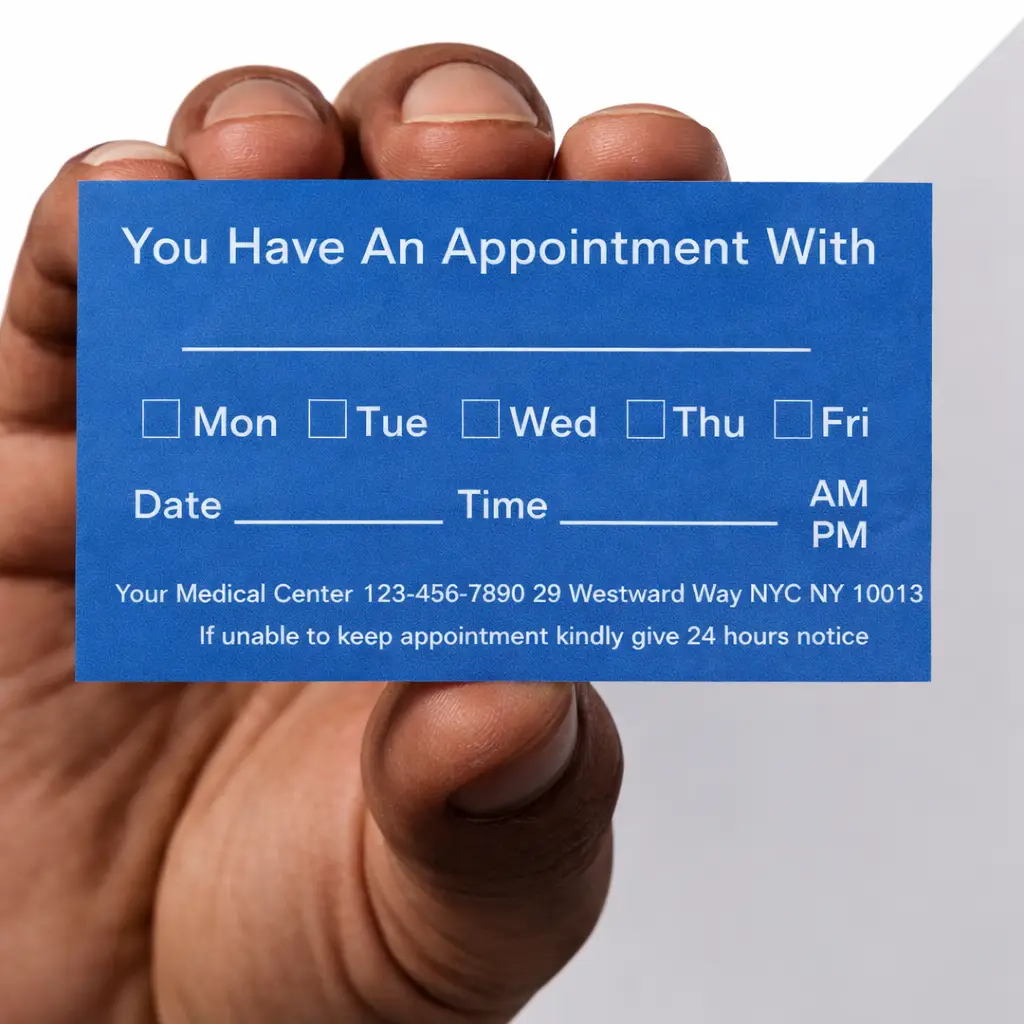
Most healthcare facilities use appointment cards to remind patients of scheduled appointments and to eliminate misunderstandings about dates and times. Make a habit of reaching for an appointment card while writing an entry in the appointment book or scheduling it on the computer. After the date and time have been written on the card, double-check with the book/computer to make sure the entries agree.

Medical appointment card provided to patients
Appointment card
Achievable

Confirmation calls

Patients who have made appointments in advance may appreciate a confirmation call to remind them they have a time set aside to see the provider. Always note the phone number the patient prefers the office to use for such calls. Many individuals have a home phone, cell phone, and work phone numbers; however, they may want calls from the provider to go only to their home phone. Highlight the preferred phone number in the medical record or indicate it on the computer. The office must use caution in making calls to patients because of the significance of privacy guidelines and standards. Some offices may want to prepare a release form in which the patient grants the office staff permission to contact the patient. Many providers insist that messages left on voice mail not mention the term “doctor” or “doctor’s office” for confidentiality reasons. The medical assistant might say, “This is Pam at Robert Welch’s office confirming your appointment tomorrow at 2 PM. Please call us if you cannot make the appointment. Our number is 555-212-0909. Thank you!”

If the patient has signed the privacy policy and the policy states that messages from the provider’s office may be left at certain numbers, the office certainly can leave messages at that number and mention that the call is from the healthcare facility. Still, it is a good idea to have an established policy on leaving messages that does not breach the patient’s confidentiality.

Email reminders

Many computer scheduling programs can send an email to patients the day before an appointment to remind them of it. This is a great timesaver for the office staff, because no time is taken to perform this duty other than the original scheduling of the appointment.

Mailed reminders

The office staff may mail reminder letters to patients. This method is a bit time-consuming with a paper-based appointment system but worth the effort if the patients show up for their appointments. Computer scheduling systems can be set up to generate the reminder letters for scheduled appointments and also to remind patients that they are due for their annual physical or influenza vaccination.

Late patients

  • Habitually late patients disrupt schedules
  • Strategies: book as last appointment, give earlier arrival time
  • Work with occasionally late patients, but protect schedule integrity

Rescheduling appointments

  • A reschedule must end with one current entry on the new date and time, and nothing left at the original time
  • Two routes reach that: remove the original and then set the new one, or move it in place in a computerized system (open and change the date/time, or cut and paste)
  • Freeing the old time is the point: it prevents double-booking and wasted follow-up, and returns a usable slot to the schedule

Emergency situations

  • Screen calls for urgency; prioritize emergencies
  • Use provider-approved criteria for emergencies vs. urgent cases
  • Never place emergency calls on hold; obtain name, number, location immediately

Provider referrals

  • Accommodate same-day requests from other providers when possible
  • Maintain flexible scheduling for referrals

Patients without appointments (walk-ins)

  • Follow office policy for walk-ins
  • Accommodate immediate needs; otherwise, schedule for later

Failed appointments

  • Causes: forgetfulness, financial issues, denial of condition
  • Use reminders (calls, emails) for forgetful patients
  • Document failed appointments for legal protection
    • Note in health record and appointment schedule
  • Contact patient to clarify reason and maintain care continuity

No-show policy

  • Define and enforce clear no-show procedures
  • First no-show: note in record; second: warn patient; third: consider dropping or restrict to same-day appointments
  • Option to charge for missed appointments; policy must be explained to patients

Increasing appointment show rates

  • Use automated call routing for reminders and confirmations
  • Provide appointment cards with accurate date/time
  • Make confirmation calls to preferred numbers, respecting privacy
  • Send email or mailed reminders as needed

Handling cancellations and delays

  • Maintain a list of patients willing to take canceled slots
  • Note cancellations in medical record if significant
  • If provider delayed: notify patients, reschedule as needed
  • If provider called to emergency: explain, offer options, contact later patients promptly
  • If provider ill/out of town: reschedule, offer alternate providers, avoid disclosing absence details for security

Patient processing

  • Reception area should be welcoming and comfortable
  • Excellent customer service encourages referrals and practice growth
  • Staff focus on patient care and positive experience

Sign up for free to take 14 quiz questions on this topic

Previous
Next  | 8.6 Handling cancellations and delays
All rights reserved ©2016 - 2026 Achievable, Inc.

Managing appointment attendance

Late patients

Every medical practice has a few patients who are habitually late for appointments. Emergencies and small delays can happen to anyone, but a patient who constantly arrives late can put a strain on the practice. Such patients can be booked as the last appointment of the day. Then, if closing time arrives before the patient does, the staff has no obligation to wait and other patients have not been inconvenienced. Some medical assistants tell the patient to come in 30 minutes before the appointment time actually scheduled. Make an attempt to work with patients who have occasional difficulties arriving on time, but do not allow the schedule to be constantly disrupted by late patients.

Rescheduling appointments

Changes sometimes must be made in the appointment schedule. Unexpected conflicts might arise that force a patient to change the appointment time. When rescheduling an appointment, what matters is where the schedule ends up: one current entry, on the new date and time, and nothing left standing at the original time. In a paper appointment book, that means removing the first appointment and then setting the new one. If the original entry survives, the patient will still be expected in the office in 2 days, time will be wasted with calls and follow-up for a visit that has already been moved, and the old slot stays blocked from a patient who asked to be seen sooner. Most computerized scheduling systems reach the same result in one step: the medical assistant opens the appointment and changes the date and time, or cuts and pastes the appointment into the new date and time. Moving the entry is what removing it and re-entering it accomplishes, so either route is correct as long as the old time comes free.

Emergencies

Periodically, emergency or urgent calls come into the office, and an appointment needs to be scheduled. To some extent, all calls that come in go through a screening process to evaluate the urgency of the need to see the provider, and emergencies are prioritized. Screening is an extremely important function that requires experience, knowledge of signs and symptoms, and tact.

Emergencies may involve emotional crises in addition to the more obvious physical problems. Patients with emergencies and those who are acutely ill should be seen the same day. The urgency of the call initially can be determined by having a list of questions prepared for reference. The medical assistant uses this list to screen and prioritize incoming calls, but the provider defines what counts as an emergency (life-threatening) versus urgent (serious but not life-threatening) within the practice, and should help develop the list. The patient may need to be referred directly to a hospital emergency department, or the provider may want to see the patient that day in the office. If patients are unable to get themselves to the hospital the medical assistant may need to contact the emergency medical services in your area. Remember to keep the patient on the phone until emergency medical technicians (EMTs) or other help arrives at the patient’s location. Never place an emergency call on hold. Always obtain the name, phone number, and location at the start of the call so that the patient can be found if he or she loses consciousness or is disconnected.

Provider referrals

If another provider telephones and requests that a patient be seen on the same day, most offices honor that request if at all possible. It is important to keep a schedule that is not intolerant of this type of request.

Patients without appointments

The provider and scheduling team should come up with a policy for patients without appointments, also referred to as walk-in patients. A patient who requires immediate attention most likely will be accommodated in the schedule somehow. If the patient does not need immediate care, a scheduled appointment at a later time may be the answer. Be sure to follow established office policy.

Failed appointments

Why do patients fail to keep appointments? Some are simply forgetful. Once this tendency is detected in a patient, form the habit of telephoning or e-mailing a reminder the day before the appointment - automated call reminders can help with this as well.

A patient who has been pressed for payment may avoid appointments out of embarrassment about being unable to pay for medical services; do not assume such patients are simply “deadbeats” who have no intention of paying.

Patients may also avoid appointments because they’re in denial about their condition - for example, after a new HIV diagnosis, since seeing the provider forces them to confront the reality of the disease. If denial is suspected, discuss it with the provider, who may want to refer the patient for counseling.

It is important to determine the reason for failed appointments and to do whatever is possible to remedy the situation. Telephone the patient to make sure no misunderstanding has occurred. If the patient’s health is such that medical care must continue, the provider may write a letter explaining this to the patient. Send the letter by certified mail with a return receipt requested. A copy of the letter needs to be added to the patient’s medical record for legal protection.

Failed appointments need to be documented in the patient’s health record and the appointment schedule for legal purposes. A patient may try to claim abandonment, when he or she has actually been the one to miss the appointments.

No-show policy

Some patients may not realize the importance of keeping their appointments. The patient who does not arrive for a scheduled appointment or reschedule it is called a no-show. A busy practice must have a very specific policy on appointment no-shows and must enforce it effectively. The first time a patient fails to show, note the fact on the health record and/or ledger card. The second time, warn the patient, and if a third no-show occurs, consider dropping the patient by using the customary methods that provide legal protection for the provider. Another option, instead of dropping a patient, is to only allow the patient to schedule for same day appointments.

The provider may wish to charge patients for not showing up for the appointment. Be understanding whenever possible, but do not let a patient take advantage of the provider’s time. The office policy manual must state that patients may be charged for missed appointments and this should be explained to new patients when their first appointment is made. Because the time slot was scheduled and the provider was ready and available to treat the patient, it is ethical to charge the patient for missing an appointment, especially if he or she did not call to cancel or reschedule. Many providers do not press this issue, but it is an available tool if needed.

Dismissal procedures, required notice periods, and whether a no-show fee is permitted are governed by state law, medical board rules, and payer contracts, not by a single national standard - always follow the office policy manual and the rules that control in your state before dismissing a patient or charging a fee.

Increasing appointment show rates

Everyone benefits from a full schedule of kept appointments. Appointment show rates can be increased in several ways.

Automated call routing

As mentioned earlier, automated call reminders can contact patients scheduled for appointments. The patient is asked to press a certain key on the phone to confirm the appointment and a different key to cancel the appointment. This same tool can be used to send messages to patients (e.g., a reminder that it is the time of year to get a flu vaccination), to introduce a new provider at the office, or announce the availability of a new procedure. The provider can even record the call so that it sounds more personal. These systems can also be set up to send text messages to remind patients of their upcoming appointments.

Appointment cards

Most healthcare facilities use appointment cards to remind patients of scheduled appointments and to eliminate misunderstandings about dates and times. Make a habit of reaching for an appointment card while writing an entry in the appointment book or scheduling it on the computer. After the date and time have been written on the card, double-check with the book/computer to make sure the entries agree.

Confirmation calls

Patients who have made appointments in advance may appreciate a confirmation call to remind them they have a time set aside to see the provider. Always note the phone number the patient prefers the office to use for such calls. Many individuals have a home phone, cell phone, and work phone numbers; however, they may want calls from the provider to go only to their home phone. Highlight the preferred phone number in the medical record or indicate it on the computer. The office must use caution in making calls to patients because of the significance of privacy guidelines and standards. Some offices may want to prepare a release form in which the patient grants the office staff permission to contact the patient. Many providers insist that messages left on voice mail not mention the term “doctor” or “doctor’s office” for confidentiality reasons. The medical assistant might say, “This is Pam at Robert Welch’s office confirming your appointment tomorrow at 2 PM. Please call us if you cannot make the appointment. Our number is 555-212-0909. Thank you!”

If the patient has signed the privacy policy and the policy states that messages from the provider’s office may be left at certain numbers, the office certainly can leave messages at that number and mention that the call is from the healthcare facility. Still, it is a good idea to have an established policy on leaving messages that does not breach the patient’s confidentiality.

Email reminders

Many computer scheduling programs can send an email to patients the day before an appointment to remind them of it. This is a great timesaver for the office staff, because no time is taken to perform this duty other than the original scheduling of the appointment.

Mailed reminders

The office staff may mail reminder letters to patients. This method is a bit time-consuming with a paper-based appointment system but worth the effort if the patients show up for their appointments. Computer scheduling systems can be set up to generate the reminder letters for scheduled appointments and also to remind patients that they are due for their annual physical or influenza vaccination.

Key points

Late patients

  • Habitually late patients disrupt schedules
  • Strategies: book as last appointment, give earlier arrival time
  • Work with occasionally late patients, but protect schedule integrity

Rescheduling appointments

  • A reschedule must end with one current entry on the new date and time, and nothing left at the original time
  • Two routes reach that: remove the original and then set the new one, or move it in place in a computerized system (open and change the date/time, or cut and paste)
  • Freeing the old time is the point: it prevents double-booking and wasted follow-up, and returns a usable slot to the schedule

Emergency situations

  • Screen calls for urgency; prioritize emergencies
  • Use provider-approved criteria for emergencies vs. urgent cases
  • Never place emergency calls on hold; obtain name, number, location immediately

Provider referrals

  • Accommodate same-day requests from other providers when possible
  • Maintain flexible scheduling for referrals

Patients without appointments (walk-ins)

  • Follow office policy for walk-ins
  • Accommodate immediate needs; otherwise, schedule for later

Failed appointments

  • Causes: forgetfulness, financial issues, denial of condition
  • Use reminders (calls, emails) for forgetful patients
  • Document failed appointments for legal protection
    • Note in health record and appointment schedule
  • Contact patient to clarify reason and maintain care continuity

No-show policy

  • Define and enforce clear no-show procedures
  • First no-show: note in record; second: warn patient; third: consider dropping or restrict to same-day appointments
  • Option to charge for missed appointments; policy must be explained to patients

Increasing appointment show rates

  • Use automated call routing for reminders and confirmations
  • Provide appointment cards with accurate date/time
  • Make confirmation calls to preferred numbers, respecting privacy
  • Send email or mailed reminders as needed

Handling cancellations and delays

  • Maintain a list of patients willing to take canceled slots
  • Note cancellations in medical record if significant
  • If provider delayed: notify patients, reschedule as needed
  • If provider called to emergency: explain, offer options, contact later patients promptly
  • If provider ill/out of town: reschedule, offer alternate providers, avoid disclosing absence details for security

Patient processing

  • Reception area should be welcoming and comfortable
  • Excellent customer service encourages referrals and practice growth
  • Staff focus on patient care and positive experience

More from Appointment scheduling

  • Introduction
  • Scheduling appointments for new patients
  • Methods and legal considerations
  • Types and telephone scheduling
  • Handling cancellations and delays